
 Posted By
Bajarangi soft ,
Posted On 30-09-2020
Posted By
Bajarangi soft ,
Posted On 30-09-2020
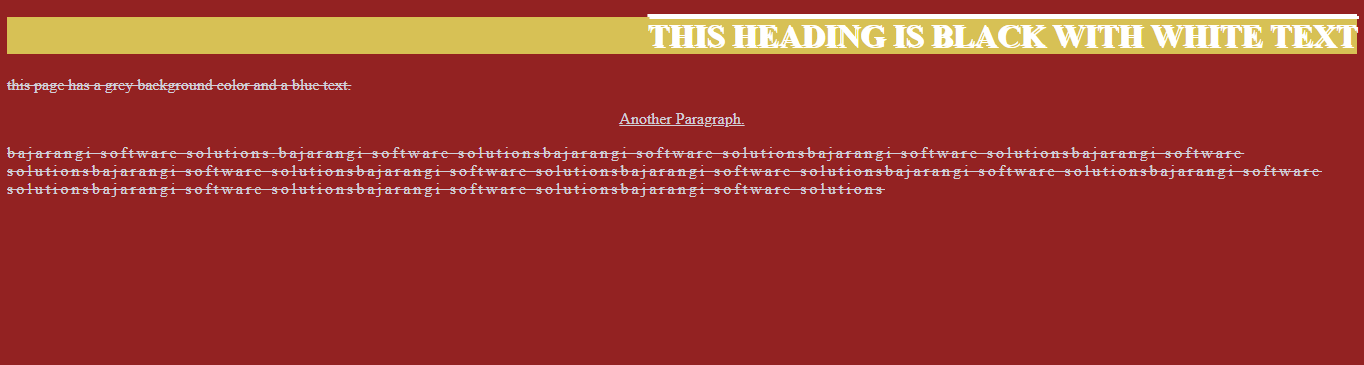
1.How To Decorate a Text using Css In HTML File
<!DOCTYPE html>
<html>
<head>
    <!--observe care fully text-align,spacing,decoration,transform,shadow styles --->
    <style>
        body {
            background-color: #932222;
            color: #d2d2d9;
        }

        h1 {
            background-color: #d7c155;
            color: white;
            text-align:right;
            text-decoration: overline;
            text-transform: uppercase;
            text-shadow: 2px 2px;
        }
        p{
            text-align: left;
            text-decoration: line-through;
            text-transform: lowercase;
        }
        .ss{
            text-align: center;
            text-decoration: underline;
            text-transform: capitalize;
        }
        #ns{
            letter-spacing: 3px;
        }
    </style>
</head>
<body>

<h1>This Heading is Black with White Text</h1>
<p>This page has a grey background color and a blue text.</p>
<p class="ss">Another paragraph.</p>


<p id="ns">bajarangi software solutions.bajarangi software solutionsbajarangi software solutionsbajarangi software solutionsbajarangi software solutionsbajarangi software solutionsbajarangi software solutionsbajarangi software solutionsbajarangi software solutionsbajarangi software solutionsbajarangi software solutionsbajarangi software solutionsbajarangi software solutions</p>
</body>
</html>
<!DOCTYPE html>
<html>
<head>

    <link rel="stylesheet" href="https://fonts.googleapis.com/css?family=Sofia">
    <style>
        .serif {
            font-family: "Times New Roman", Times, serif;
            font-style: italic;
            font-weight: lighter;
            font-size: 20px;
        }

        .sansserif {
            font-family:sofia;
            font-style: normal;
            font-weight: bold;
            font-size: 40px;
        }

        .monospace {
            font: italic bold 12px/30px Georgia, serif;
            font-style: oblique;
            font-weight: 900;
            font-size: 60px;


        }
    </style>
</head>
<body>

<h1>CSS font-family</h1>
<p class="serif">This is a paragraph, shown in the Times New Roman font.</p>
<p class="sansserif">This is a paragraph, shown in the Arial font.</p>
<p class="monospace">This is a paragraph, shown in the Lucida Console font.</p>

</body>
</html>
<!DOCTYPE html>
<html>
<head>

    <link rel="stylesheet" href="https://fonts.googleapis.com/css?family=Sofia">
    <style>

        body{
            background-color: brown;
        }
        .serif {
            font-family: "Times New Roman", Times, serif;
            font-style: italic;
            font-weight: lighter;
            font-size: 20px;
            background-color: #efebd8;
            color: #1f1c1c;
            text-align:right;
            text-decoration: overline;
            text-transform: uppercase;
            text-shadow: 2px 2px;
        }

        .sansserif {
            font-family:sofia;
            font-style: normal;
            font-weight: bold;
            font-size: 40px;
            text-align: left;
            text-decoration: line-through;
            text-transform: lowercase;
        }

        .monospace {
            font: italic bold 12px/30px Georgia, serif;
            font-style: oblique;
            font-weight: 900;
            font-size: 60px;
            text-align: center;
            text-decoration: underline;
            text-transform: capitalize;

        }
    </style>
</head>
<body>

<h1>CSS font-family</h1>
<p class="serif">This is a paragraph, shown in the Times New Roman font.</p>
<p class="sansserif">This is a paragraph, shown in the Arial font.</p>
<p class="monospace">This is a paragraph, shown in the Lucida Console font.</p>

</body>
</html>