
 Posted By
Bajarangi soft ,
Posted On 10-10-2020
Posted By
Bajarangi soft ,
Posted On 10-10-2020
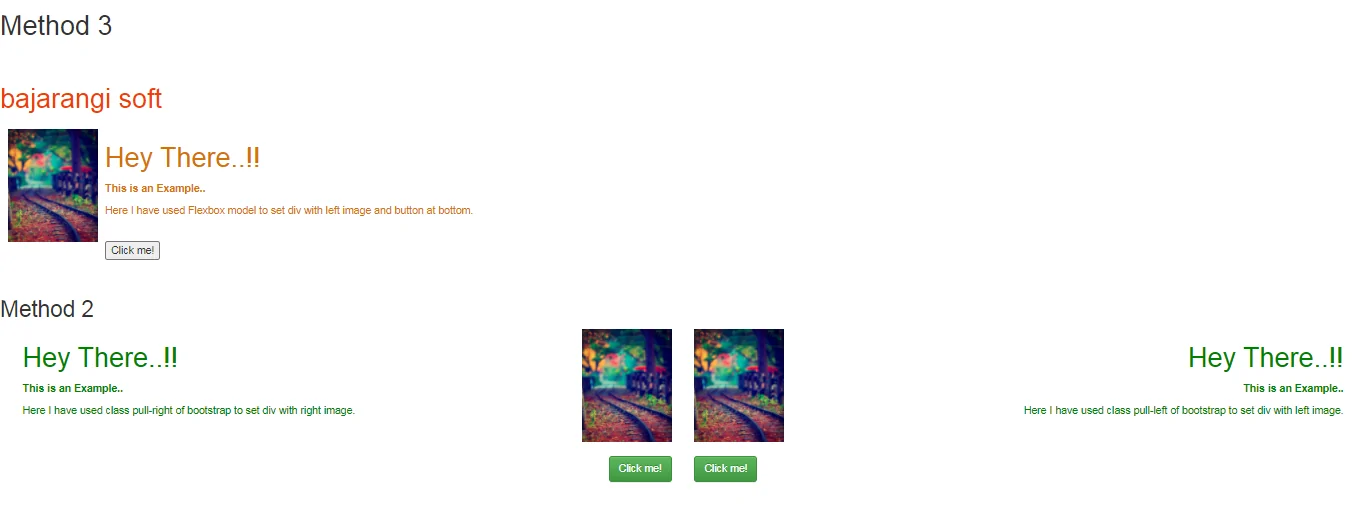
We can set div with left image and button at the bottom by two methods as follows:
It is same as CSS property
position: relative.
Position-absolute
It is same as CSS property position: absolute.
Example:1
<!DOCTYPE html>
<html lang="en">
<head>
    <!-- Required meta tags -->
    <meta charset="utf-8" />
    <meta name="viewport" content="width=device-width,initial-scale=1,shrink-to-fit=no" />
    <!-- Bootstrap CSS -->
    <link rel="stylesheet" href="https://stackpath.bootstrapcdn.com/bootstrap/4.5.0/css/bootstrap.min.css" integrity="sha384-9aIt2nRpC12Uk9gS9baDl411NQApFmC26EwAOH8WgZl5MYYxFfc+NcPb1dKGj7Sk" crossorigin="anonymous" />
    <script src="https://kit.fontawesome.com/577845f6a5.js" crossorigin="anonymous"></script>
    <title>Set div with left image</title>
    <style type="text/css">
        .bottom-left {
            left: 0;
        }
    </style>
</head>
<body>
<h1 style="color: #006400;">
    <br />
  Bajarangi Soft
</h1>
<div class="float-left">
    <img src="b1.jpg" height="150" />
</div>
<div class="position-relative" style="color: green;">
    <h1>Hey There..!!</h1>
    <p><b>This is an Example..</b></p>
    <p>Here I have used class float-left of
        bootstrap to set div with left image.</p>
    <br />
</div>
<div class="position-relative">
    <div class="position-absolute bottom-left">
        <button type="button"
                class="btn btn-success">
            Click me!
        </button>
    </div>
</div>
</body>
</html>
<!DOCTYPE html>
<html lang="en">
<head>
    <!-- Required meta tags -->
    <meta charset="utf-8" />
    <meta name="viewport" content="width=device-width, initial-scale=1, shrink-to-fit=no" />
    <!-- Bootstrap CSS -->
    <!-- Latest compiled and minified CSS -->
    <link rel="stylesheet" href="https://maxcdn.bootstrapcdn.com/bootstrap/3.3.7/css/bootstrap.min.css" integrity="sha384-BVYiiSIFeK1dGmJRAkycuHAHRg32OmUcww7on3RYdg4Va+PmSTsz/K68vbdEjh4u" crossorigin="anonymous" />

    <!-- Optional theme -->
    <link rel="stylesheet" href="https://maxcdn.bootstrapcdn.com/bootstrap/3.3.7/css/bootstrap-theme.min.css" integrity="sha384-rHyoN1iRsVXV4nD0JutlnGaslCJuC7uwjduW9SVrLvRYooPp2bWYgmgJQIXwl/Sp" crossorigin="anonymous" />

    <!-- Latest compiled and minified JavaScript -->
    <script src="https://maxcdn.bootstrapcdn.com/bootstrap/3.3.7/js/bootstrap.min.js" integrity="sha384-Tc5IQib027qvyjSMfHjOMaLkfuWVxZxUPnCJA7l2mCWNIpG9mGCD8wGNIcPD7Txa" crossorigin="anonymous"></script>
    <title>Set div with left image</title>
    <style type="text/css">
        .bottom-left {
            left: 0;
        }
        .bottom-right {
            right: 0;
        }
    </style>
</head>
<body>
<div class="container-fluid">
    <div class="col-md-6">
        <div class="pull-right">
            <img src=
                         "b1.jpg"
                 height="150" />
        </div>
        <div style="color: green; text-align: left;">
            <h1>Hey There..!!</h1>
            <p><b>This is an Example..</b></p>
            <p>Here I have used class pull-right of
                bootstrap to set div with right image.
            </p>
            <br />
            <br />
        </div>
        <div class="pull-right bottom-right">
            <button type="button"
                    class="btn btn-success">
                Click me!
            </button>
        </div>
    </div>
    <div class="col-md-6">
        <div class="pull-left">
            <img src=
                         "b1.jpg"
                 height="150" />
        </div>
        <div style="color: green;
                     text-align: right;">
            <h1>Hey There..!!</h1>
            <p><b>This is an Example..</b></p>
            <p>Here I have used class pull-left of
                bootstrap to set div with left image.
            </p>
            <br />
            <br />
        </div>
        <div class="pull-left bottom-left">
            <button type="button"
                    class="btn btn-success">
                Click me!
            </button>
        </div>
    </div>
</div>
</body>
</html>
<!DOCTYPE html>
<html lang="en">
<head>
    <!-- Required meta tags -->
    <meta charset="utf-8" />
    <meta name="viewport"
          content="width=device-width,
               initial-scale=1,
               shrink-to-fit=no" />
    <title>Set div with left image</title>
    <style type="text/css">
        .flex_row {
            display: flex;
            flex-direction: row;
            flex-wrap: nowrap;
            justify-content: flex-start;
            align-content: stretch;
            align-items: flex-start;
        }
        .article {
            box-sizing: border-box;
            flex: 1 1 50%;
            align-self: stretch;
            padding: 10px;
        }
        .content {
            box-sizing: border-box;
            flex: 1 1 auto;
            align-self: stretch;
            padding: 0 10px;
            display: flex;
            flex-direction: column;
            flex-wrap: nowrap;
        }
        .innercontent {
            flex: 1 1 auto;
            align-self: stretch;
            color: #d4720a;
        }
        .buttonBar {
            flex: 0 0 auto;
        }
        .onRight {
            text-align: left;
        }
    </style>
</head>
<body>
<h1 style="color: #ee3f0b;">
    <br />
bajarangi soft
</h1>
<div class="flex_row">
    <div class="article onRight flex_row">
        <div class="image">
            <img src="b1.jpg" height="150" />
        </div>
        <div class="content">
            <div class="innercontent">
                <h1>Hey There..!!</h1>
                <p><b>This is an Example..
                </b></p>
                <p>Here I have used Flexbox model
                    to set div with left image
                    and button at bottom.</p>
                <br />
            </div>
            <div class="buttonBar">
                <button>Click me!</button>
            </div>
        </div>
    </div>
</div>
</body>
</html>
<br>