
 Posted By
Bajarangi soft ,
Posted On 01-10-2020
Posted By
Bajarangi soft ,
Posted On 01-10-2020
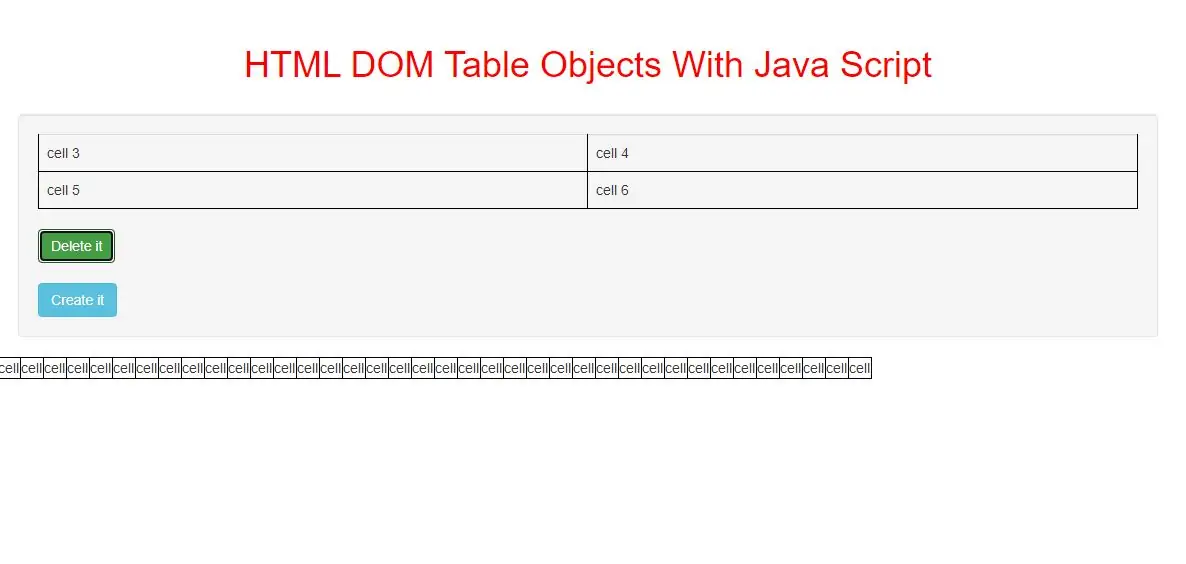
Table Object
The Table object represents an HTML <table> element.
Access a Table Object
You can access a <table> element by using getElementById():
Example(1)
<button class="btn btn-success" onclick="delete_cell()">Delete it</button>

<script>
    function delete_cell() {
        var x = document.getElementById("Table");
        x.deleteRow(0);
    }
</script>
<button onclick="create_table()">Create it</button>

<script>
    function create_table() {
        var x = document.createElement("TABLE");
        x.setAttribute("id", "myTable");
        document.body.appendChild(x);

        var y = document.createElement("TR");
        y.setAttribute("id", "myTr");
        document.getElementById("myTable").appendChild(y);

        var z = document.createElement("TD");
        var t = document.createTextNode("cell");
        z.appendChild(t);
        document.getElementById("myTr").appendChild(z);
    }
</script>
<!DOCTYPE html>
<html>
<head>
    <title>How To Use HTML DOM Table Objects With Java Script</title>
    <meta charset="utf-8">
    <meta name="viewport" content="width=device-width, initial-scale=1">
    <link rel="stylesheet" href="https://maxcdn.bootstrapcdn.com/bootstrap/3.4.1/css/bootstrap.min.css">
</head>
<style>
    h1{
        color:red;
    }
    table, td {
        border: 1px solid black;
    }
</style>
<body>
<div class="container">
    <br>
    <br>
    <div class="text-center">
        <h1>HTML DOM Table Objects With Java Script</h1>
    </div>
    <br>
        <div class="well">
            <table id="Table" class="table">
                <tr>
                    <td>cell 1</td>
                    <td>cell 2</td>
                </tr>
                <tr>
                    <td>cell 3</td>
                    <td>cell 4</td>
                </tr>
                <tr>
                    <td>cell 5</td>
                    <td>cell 6</td>
                </tr>
            </table>
            <button class="btn btn-success" onclick="Delete_function()">Delete it</button><br><br>
            <button class="btn btn-info" onclick="create_function()">Create it</button>
        </div>
    <div>
</body>
</html>
<script>
    function Delete_function() {
        var x = document.getElementById("Table");
        x.deleteRow(0);
    }
    function create_function() {
        var x = document.createElement("TABLE");
        x.setAttribute("id", "myTable");
        document.body.appendChild(x);

        var y = document.createElement("TR");
        y.setAttribute("id", "myTr");
        document.getElementById("myTable").appendChild(y);

        var z = document.createElement("TD");
        var t = document.createTextNode("cell");
        z.appendChild(t);
        document.getElementById("myTr").appendChild(z);
    }
</script>
Table Object Collections
| Collection | Description |
|---|---|
| rows | Returns a collection of all <tr> elements in a table |
| tBodies | Returns a collection of all <tbody> elements in a table |
Table Object Properties
| Property | Description |
|---|---|
| align | Not supported in HTML5. Use style.cssFloat instead. Sets or returns the alignment of a table according to surrounding text |
| background | Not supported in HTML5. Use style.background instead. Sets or returns the background image of a table |
| bgColor | Not supported in HTML5. Use style.backgroundColor instead. Sets or returns the background color of a table |
| border | Deprecated. Use style.border instead. Sets or returns the width of the table border. |
| caption | Returns the <caption> element of a table |
| cellPadding | Not supported in HTML5. Use style.padding instead. Sets or returns the amount of space between the cell border and cell content |
| cellSpacing | Not supported in HTML5. Use style.borderSpacing instead. Sets or returns the amount of space between the cells in a table |
| frame | Not supported in HTML5. Sets or returns which outer-borders (of a table) that should be displayed |
| height | Not supported in HTML5. Use style.height instead. Sets or returns the height of a table |
| rules | Not supported in HTML5. Sets or returns which inner-borders (between the cells) that should be displayed in a table |
| summary | Not supported in HTML5. Sets or returns a description of the data in a table |
| tFoot | Returns a reference to the <tfoot> element of a table |
| tHead | Returns a reference to the <thead> element of a table |
| width | Not supported in HTML5. Use style.width instead. Sets or returns the width of the table |
Table Object Methods
| Method | Description |
|---|---|
| createCaption() | Creates an empty <caption> element and adds it to the table |
| createTFoot() | Creates an empty <tfoot> element and adds it to the table |
| createTHead() | Creates an empty <thead> element and adds it to the table |
| deleteCaption() | Removes the first <caption> element from the table |
| deleteRow() | Removes a row (<tr>) from the table |
| deleteTFoot() | Removes the <tfoot> element from the table |
| deleteTHead() | Removes the <thead> element from the table |
| insertRow() | Creates an empty <tr> element and adds it to the table |