
 Posted By
Bajarangi soft ,
Posted On 27-11-2020
Posted By
Bajarangi soft ,
Posted On 27-11-2020
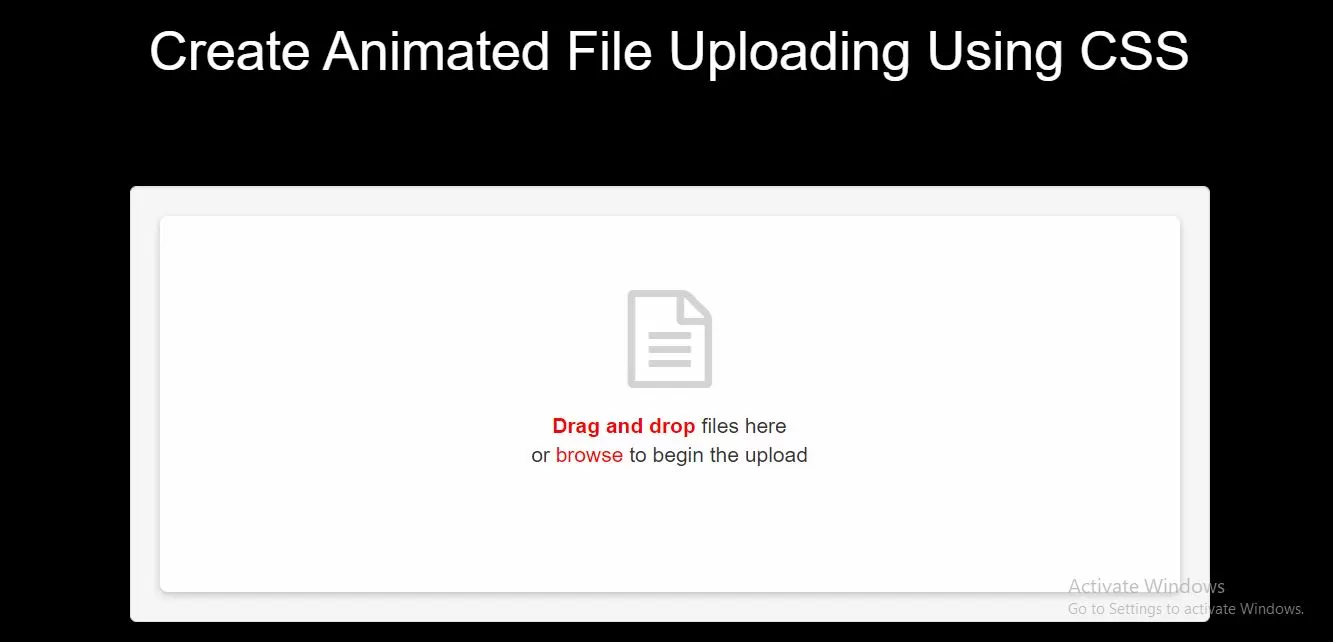
Complete Code For Creating Animated File Uploading Using CSS.
<!DOCTYPE html>
<html>
<head>
    <title>How Can I Create Animated File Uploading Using CSS</title>
    <meta name="viewport" content="width=device-width, initial-scale=1.0">
    <link href="//maxcdn.bootstrapcdn.com/bootstrap/3.3.0/css/bootstrap.min.css" rel="stylesheet">
    <script src="https://cdnjs.cloudflare.com/ajax/libs/jquery/2.1.3/jquery.min.js"></script>
    <link href="https://maxcdn.bootstrapcdn.com/font-awesome/4.7.0/css/font-awesome.min.css" rel="stylesheet">
</head>
<style>


    body {
        background: black
    }

    .upload {
        position: relative;
        width: 100%;
        min-height: 225px;
        box-sizing: border-box;
        border-radius: 5px;
        box-shadow: 0 2px 5px rgba(0, 0, 0, 0.2);
        padding-bottom: 20px;
        background: #fff;
        -webkit-animation: fadeup .5s .5s ease both;
        animation: fadeup .5s .5s ease both;
        -webkit-transform: translateY(20px);
        transform: translateY(20px);
        opacity: 0;
    }

    .upload .upload-files .body {
        text-align: center;
        padding: 50px 0;
        padding-bottom: 30px;
    }

    .upload .upload-files .body.hidden {
        display: none;
    }

    .upload .upload-files .body input {
        visibility: hidden;
    }

    .upload .upload-files .body i {
        font-size: 65px;
        color: lightgray;
    }

    .upload .upload-files .body p {
        font-size: 14px;
        padding-top: 15px;
        line-height: 1.4;
    }

    .upload .upload-files .body p b,
    .upload .upload-files .body p a {
        color: red;
    }

    .upload .upload-files .body.active {
        border: dashed 2px red;
    }

    .fa-check {
        color: white;
        margin: auto;
        padding: 12px;
    }

    .upload .upload-files .body.active i {
        box-shadow: 0 0 0 -3px #fff, 0 0 0 lightgray, 0 0 0 -3px #fff, 0 0 0 lightgray;
        -webkit-animation: file .5s ease both;
        animation: file .5s ease both;
    }

    @-webkit-keyframes file {
        50% {
            box-shadow: -8px 8px 0 -3px #fff, -8px 8px 0 lightgray, -8px 8px 0 -3px #fff, -8px 8px 0 lightgray;
        }
        75%,
        100% {
            box-shadow: -8px 8px 0 -3px #fff, -8px 8px 0 lightgray, -16px 16px 0 -3px #fff, -16px 16px 0 lightgray;
        }
    }

    @keyframes file {
        50% {
            box-shadow: -8px 8px 0 -3px #fff, -8px 8px 0 lightgray, -8px 8px 0 -3px #fff, -8px 8px 0 lightgray;
        }
        75%,
        100% {
            box-shadow: -8px 8px 0 -3px #fff, -8px 8px 0 lightgray, -16px 16px 0 -3px #fff, -16px 16px 0 lightgray;
        }
    }

    .upload .upload-files .body.active .pointer-none {
        pointer-events: none;
    }

    .upload .upload-files footer {
        width: 100%;
        margin: 0 auto;
        height: 0;
    }

    .upload .upload-files footer .divider {
        margin: 0 auto;
        width: 0;
        border-top: solid 4px green;
        text-align: center;
        overflow: hidden;
        -webkit-transition: width .5s ease;
        transition: width .5s ease;
    }

    .upload .upload-files footer .divider span {
        display: inline-block;
        -webkit-transform: translateY(-25px);
        transform: translateY(-25px);
        font-size: 12px;
        padding-top: 8px;
    }

    .upload .upload-files footer.hasFiles {
        height: auto;
    }

    .upload .upload-files footer.hasFiles .divider {
        width: 100%;
    }

    .upload .upload-files footer.hasFiles .divider span {
        -webkit-transform: translateY(0);
        transform: translateY(0);
        -webkit-transition: -webkit-transform .5s .5s ease;
        transition: -webkit-transform .5s .5s ease;
        transition: transform .5s .5s ease;
        transition: transform .5s .5s ease, -webkit-transform .5s .5s ease;
    }

    .upload .upload-files footer .list-files {
        width: 320px;
        margin: 0 auto;
        margin-top: 15px;
        padding-left: 5px;
        text-align: center;
        overflow-x: hidden;
        overflow-y: auto;
        max-height: 210px;
    }

    .upload .upload-files footer .list-files::-webkit-scrollbar-track {
        background-color: rgba(211, 211, 211, 0.25);
    }

    .upload .upload-files footer .list-files::-webkit-scrollbar {
        width: 4px;
        background-color: rgba(211, 211, 211, 0.25);
    }

    .upload .upload-files footer .list-files::-webkit-scrollbar-thumb {
        background-color: rgba(77, 182, 172, 0.5);
    }

    .upload .upload-files footer .list-files .file {
        width: 300px;
        min-height: 50px;
        display: -webkit-box;
        display: flex;
        -webkit-box-pack: justify;
        justify-content: space-between;
        -webkit-box-align: center;
        align-items: center;
        opacity: 0;
        -webkit-animation: fade .35s ease both;
        animation: fade .35s ease both;
    }

    .upload .upload-files footer .list-files .file .name {
        font-size: 12px;
        white-space: nowrap;
        text-overflow: ellipsis;
        overflow: hidden;
        width: 80px;
        text-align: left;
    }

    .upload .upload-files footer .list-files .file .progress {
        width: 175px;
        height: 5px;
        border: solid 1px lightgray;
        border-radius: 2px;
        background: -webkit-gradient(linear, right top, left top, from(rgba(77, 182, 172, 0.2)), to(rgba(77, 182, 172, 0.8))) no-repeat;
        background: linear-gradient(to left, rgba(77, 182, 172, 0.2), rgba(77, 182, 172, 0.8)) no-repeat;
        background-size: 100% 100%;
    }

    .upload .upload-files footer .list-files .file .progress.active {
        -webkit-animation: progress 30s linear;
        animation: progress 30s linear;
    }

    @-webkit-keyframes progress {
        from {
            background-size: 0 100%;
        }
        to {
            background-size: 100% 100%;
        }
    }

    @keyframes progress {
        from {
            background-size: 0 100%;
        }
        to {
            background-size: 100% 100%;
        }
    }

    .upload .upload-files footer .list-files .file .done {
        cursor: pointer;
        width: 40px;
        height: 40px;
        background: green;
        border-radius: 50%;
        margin-left: -10px;
        -webkit-transform: scale(0);
        transform: scale(0);
        position: relative;
    }

    .upload .upload-files footer .list-files .file .done:before {
        content: "View";
        position: absolute;
        top: 0;
        left: -5px;
        font-size: 24px;
        opacity: 0;
    }

    .upload .upload-files footer .list-files .file .done:hover:before {
        -webkit-transition: all .25s ease;
        transition: all .25s ease;
        top: -30px;
        opacity: 1;
    }

    .upload .upload-files footer .list-files .file .done.anim {
        -webkit-animation: done1 .5s ease forwards;
        animation: done1 .5s ease forwards;
    }

    .upload .upload-files footer .list-files .file .done.anim #path {
        -webkit-animation: done2 2.5s .5s ease forwards;
        animation: done2 2.5s .5s ease forwards;
    }

    .upload .upload-files footer .list-files .file .done #path {
        stroke-dashoffset: 7387.59423828125;
        stroke-dasharray: 7387.59423828125 7387.59423828125;
        stroke: #fff;
        fill: transparent;
        stroke-width: 50px;
    }

    @-webkit-keyframes done2 {
        to {
            stroke-dashoffset: 0;
        }
    }

    @keyframes done2 {
        to {
            stroke-dashoffset: 0;
        }
    }

    @-webkit-keyframes done1 {
        50% {
            -webkit-transform: scale(0.5);
            transform: scale(0.5);
            opacity: 1;
        }
        80% {
            -webkit-transform: scale(0.25);
            transform: scale(0.25);
            opacity: 1;
        }
        100% {
            -webkit-transform: scale(0.5);
            transform: scale(0.5);
            opacity: 1;
        }
    }

    @keyframes done1 {
        50% {
            -webkit-transform: scale(0.5);
            transform: scale(0.5);
            opacity: 1;
        }
        80% {
            -webkit-transform: scale(0.25);
            transform: scale(0.25);
            opacity: 1;
        }
        100% {
            -webkit-transform: scale(0.5);
            transform: scale(0.5);
            opacity: 1;
        }
    }

    .upload .upload-files footer .importar {
        outline: none;
        position: absolute;
        left: 0;
        right: 0;
        bottom: 20px;
        margin: auto;
        border: solid 1px red;
        color: red;
        background: transparent;
        padding: 8px 15px;
        font-size: 12px;
        border-radius: 4px;
        font-family: Roboto;
        line-height: 1;
        cursor: pointer;
        -webkit-transform: translateY(15px);
        transform: translateY(15px);
        opacity: 0;
        visibility: hidden;
        margin-left: calc(50% - 40px);
    }

    .upload .upload-files footer .importar.active {
        -webkit-transition: opacity .5s 1.5s ease, background, -webkit-transform .5s 1.5s ease;
        transition: opacity .5s 1.5s ease, background, -webkit-transform .5s 1.5s ease;
        transition: transform .5s 1.5s ease, opacity .5s 1.5s ease, background;
        transition: transform .5s 1.5s ease, opacity .5s 1.5s ease, background, -webkit-transform .5s 1.5s ease;
        -webkit-transform: translateY(0);
        transform: translateY(0);
        opacity: 1;
        visibility: visible;
    }

    .upload .upload-files footer .importar:hover {
        background: red;
        color: #fff;
    }

    @-webkit-keyframes fadeup {
        to {
            -webkit-transform: translateY(0);
            transform: translateY(0);
            opacity: 1;
        }
    }

    @keyframes fadeup {
        to {
            -webkit-transform: translateY(0);
            transform: translateY(0);
            opacity: 1;
        }
    }

    @-webkit-keyframes faderight {
        to {
            -webkit-transform: translateX(0);
            transform: translateX(0);
            opacity: 1;
        }
    }

    @keyframes faderight {
        to {
            -webkit-transform: translateX(0);
            transform: translateX(0);
            opacity: 1;
        }
    }

    @-webkit-keyframes fade {
        to {
            opacity: 1;
        }
    }

    @keyframes fade {
        to {
            opacity: 1;
        }
    }

    @media (max-width: 400px) {
        .upload {
            width: 100%;
            height: 100%;
        }
    }
</style>
<body>
<br/><br/>
<div class="container">
    <br>
    <div class="text-center">
        <h1 id="color" style="color: white;">Create Animated File Uploading Using CSS</h1>
    </div>
    <br><br><br>

    <div class="well">
        <div class="upload">
            <div class="upload-files">
                <div class="body" id="drop">
                    <i class="fa fa-file-text-o pointer-none" aria-hidden="true"></i>
                    <p class="pointer-none"><b>Drag and drop</b> files here <br/> or <a href=""
                                                                                        id="triggerFile">browse</a> to
                        begin the upload</p>
                    <input type="file" multiple="multiple"/>
                </div>
                <footer>
                    <div class="divider">
                        <span><AR>FILES</AR></span>
                    </div>
                    <div class="list-files">
                    </div>
                    <button class="importar">UPDATE FILES</button>
                </footer>
            </div>
        </div>

    </div>
</div>
</body>
</html>
<script>
    //DOM
    const $ = document.querySelector.bind(document);

    //APP
    let App = {};
    App.init = (function () {
        //Init
        function handleFileSelect(evt) {
            const files = evt.target.files; // FileList object

            //files template
            let template = `${Object.keys(files)
                .map(file => `<div class="file file--${file}">
     <div class="name"><span>${files[file].name}</span></div>
     <div class="progress active"></div>
     <div class="done">
   <a href="" target="_blank">
     <i class="fa fa-check" ></i>
                  </a>
     </div>
    </div>`)
                .join("")}`;

            $("#drop").classList.add("hidden");
            $("footer").classList.add("hasFiles");
            $(".importar").classList.add("active");
            setTimeout(() => {
                $(".list-files").innerHTML = template;
            }, 1000);

            Object.keys(files).forEach(file => {
                let load = 2000 + (file * 2000); // fake load
                setTimeout(() => {
                    $(`.file--${file}`).querySelector(".progress").classList.remove("active");
                    $(`.file--${file}`).querySelector(".done").classList.add("anim");
                }, load);
            });
        }

        // trigger input
        $("#triggerFile").addEventListener("click", evt => {
            evt.preventDefault();
            $("input[type=file]").click();
        });

        // drop events
        $("#drop").ondragleave = evt => {
            $("#drop").classList.remove("active");
            evt.preventDefault();
        };
        $("#drop").ondragover = $("#drop").ondragenter = evt => {
            $("#drop").classList.add("active");
            evt.preventDefault();
        };
        $("#drop").ondrop = evt => {
            $("input[type=file]").files = evt.dataTransfer.files;
            $("footer").classList.add("hasFiles");
            $("#drop").classList.remove("active");
            evt.preventDefault();
        };

        //upload more
        $(".importar").addEventListener("click", () => {
            $(".list-files").innerHTML = "";
            $("footer").classList.remove("hasFiles");
            $(".importar").classList.remove("active");
            setTimeout(() => {
                $("#drop").classList.remove("hidden");
            }, 500);
        });

        // input change
        $("input[type=file]").addEventListener("change", handleFileSelect);
    })();

</script>