
 Posted By
Bajarangi soft ,
Posted On 20-01-2021
Posted By
Bajarangi soft ,
Posted On 20-01-2021
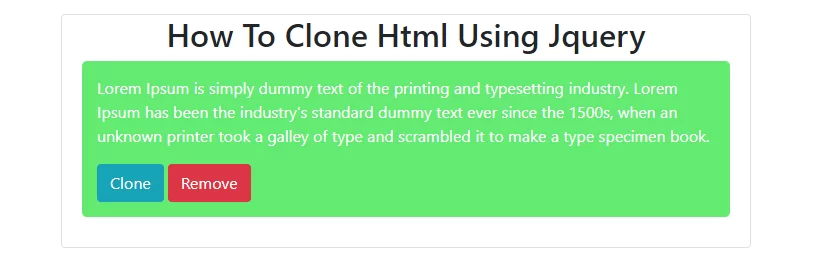
Step 1:Create index.html and implement below html code in it.
<div class="container">
    <div class="col-md-12 bs_card mt-3">
        <div class="col-md-8">
            <div class="card">
                <div class="card-body pt-0">
                    <h2 class="text-center">How To Clone Html Using Jquery</h2>
                    <div class="cloneDiv">
                        <div>
                            <p>Lorem Ipsum is simply dummy text of the printing and typesetting industry. Lorem Ipsum has been the industry's standard dummy text ever since the 1500s, when an unknown printer took a galley of type and scrambled it to make a type specimen book.</p>
                        </div>
                        <div class="actions">
                            <button class="clone btn btn-info">Clone</button>
                            <button class="remove btn btn-danger">Remove</button>
                        </div>
                    </div>

                </div>
            </div>
        </div>
    </div>
</div>
<script>
    var regex = /^(.+?)(\d+)$/i;
    var cloneIndex = $(".cloneDiv").length;

    function clone(){
        $(this).parents(".cloneDiv").clone()
            .appendTo(".card-body")
            .attr("id", "cloneDiv" +  cloneIndex)
            .find("*")
            .each(function() {
                var id = this.id || "";
                var match = id.match(regex) || [];
                if (match.length == 3) {
                    this.id = match[1] + (cloneIndex);
                }
            })
            .on('click', 'button.clone', clone)
            .on('click', 'button.remove', remove);
        cloneIndex++;
    }
    function remove(){
        $(this).parents(".cloneDiv").remove();
    }
    $("button.clone").on("click", clone);

    $("button.remove").on("click", remove);
</script>
<style>
    body {
        padding: 10px;
    }

    .cloneDiv {
        padding: 10px;
        border-radius: 5px;
        background-color: #63ea72;
        margin-bottom: 10px;
        color: white;
    }

    .cloneDiv div {
        margin: 5px;
    }
</style>
<!DOCTYPE html>
<html lang="en">
<head>
    <title>Clone Jquery</title>
    <meta charset="utf-8">
    <meta name="viewport" content="width=device-width, initial-scale=1">
    <link rel="stylesheet" href="https://maxcdn.bootstrapcdn.com/bootstrap/4.5.0/css/bootstrap.min.css">
    <script src="https://ajax.googleapis.com/ajax/libs/jquery/3.5.1/jquery.min.js"></script>
    <script src="https://cdnjs.cloudflare.com/ajax/libs/popper.js/1.16.0/umd/popper.min.js"></script>
    <script src="https://maxcdn.bootstrapcdn.com/bootstrap/4.5.0/js/bootstrap.min.js"></script>
    <style>
        body {
            padding: 10px;
        }

        .cloneDiv {
            padding: 10px;
            border-radius: 5px;
            background-color: #63ea72;
            margin-bottom: 10px;
            color: white;
        }

        .cloneDiv div {
            margin: 5px;
        }
    </style>
</head>
<body>
<div class="container">
    <div class="col-md-12 bs_card mt-3">
        <div class="col-md-8">
            <div class="card">
                <div class="card-body pt-0">
                    <h2 class="text-center">How To Clone Html Using Jquery</h2>
                    <div class="cloneDiv">
                        <div>
                            <p>Lorem Ipsum is simply dummy text of the printing and typesetting industry. Lorem Ipsum has been the industry's standard dummy text ever since the 1500s, when an unknown printer took a galley of type and scrambled it to make a type specimen book.</p>
                        </div>
                        <div class="actions">
                            <button class="clone btn btn-info">Clone</button>
                            <button class="remove btn btn-danger">Remove</button>
                        </div>
                    </div>

                </div>
            </div>
        </div>
    </div>
</div>


<script>
    var regex = /^(.+?)(\d+)$/i;
    var cloneIndex = $(".cloneDiv").length;

    function clone(){
        $(this).parents(".cloneDiv").clone()
            .appendTo(".card-body")
            .attr("id", "cloneDiv" +  cloneIndex)
            .find("*")
            .each(function() {
                var id = this.id || "";
                var match = id.match(regex) || [];
                if (match.length == 3) {
                    this.id = match[1] + (cloneIndex);
                }
            })
            .on('click', 'button.clone', clone)
            .on('click', 'button.remove', remove);
        cloneIndex++;
    }
    function remove(){
        $(this).parents(".cloneDiv").remove();
    }
    $("button.clone").on("click", clone);

    $("button.remove").on("click", remove);
</script>
</body>
</html>