
 Posted By
Bajarangi soft ,
Posted On 02-11-2020
Posted By
Bajarangi soft ,
Posted On 02-11-2020
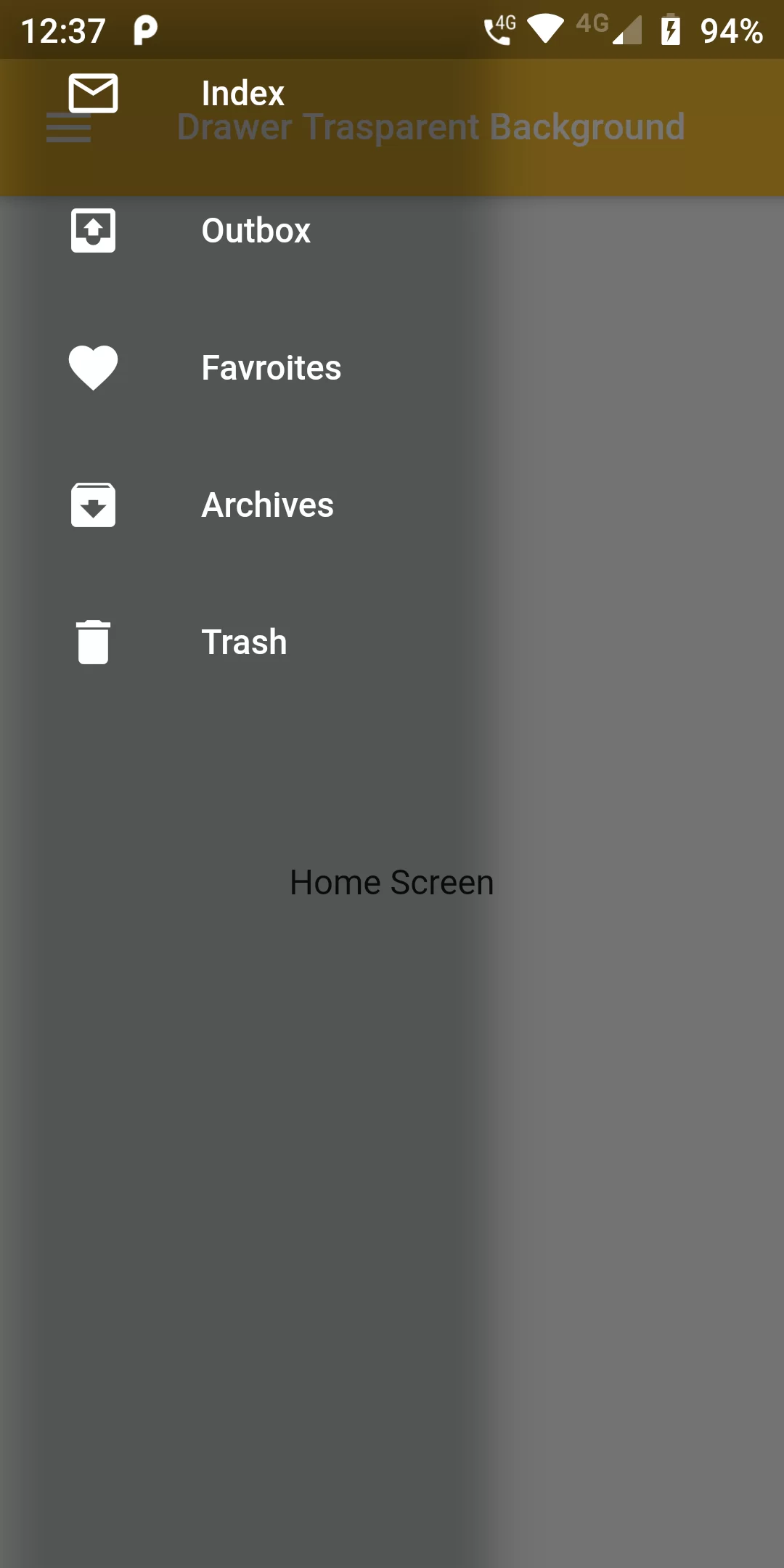
Drawer Trasparent Background
Complete Code For Drawer Trasparent Background In Flutter
main.dart
import 'package:flutter/material.dart';

void main(){
  runApp(MyApp());
}

class MyApp extends StatelessWidget {
  @override
  Widget build(BuildContext context) {
    return MaterialApp(
      debugShowCheckedModeBanner: false,
      home: MyHomePage(),
    );
  }
}

class MyHomePage extends StatefulWidget {
  @override
  _MyHomePageState createState() => _MyHomePageState();
}

class _MyHomePageState extends State<MyHomePage> {
  @override
  Widget build(BuildContext context) {
    return Scaffold(
      appBar: AppBar(
        backgroundColor: Colors.yellow[700],
        title: Text("Drawer Trasparent Background",style: TextStyle(fontSize: 15),),
      ),
      drawer: Theme(
        data: Theme.of(context).copyWith(
        canvasColor: Colors.transparent,
        ),
          child:  Container(
             width: 200,
             child: Drawer(
              child: Container(
                 color: Colors.transparent,
                 child: ListView(
                   padding: EdgeInsets.all(10.0),
                   children: [
                     ListTile(
                       leading: Icon(Icons.mail_outline, color: Colors.white,),
                       title: Text('Index',style: TextStyle(color: Colors.white),),
                     ),
                     ListTile(
                       leading: Icon(Icons.outbox, color: Colors.white,),
                       title: Text('Outbox',style: TextStyle(color: Colors.white),),
                     ),
                     ListTile(
                       leading: Icon(Icons.favorite, color: Colors.white,),
                       title: Text('Favroites',style: TextStyle(color: Colors.white),),
                     ),
                     ListTile(
                       leading: Icon(Icons.archive, color: Colors.white,),
                       title: Text('Archives',style: TextStyle(color: Colors.white),),
                     ),
                     ListTile(
                       leading: Icon(Icons.delete, color: Colors.white,),
                       title: Text('Trash',style: TextStyle(color: Colors.white),),
                     ),
                   ],
                 ),
             ),
           ),
         ),
        ),
      body: Center(
        child: Text("Home Screen"),
      ),
    );
  }
}