
 Posted By
Bajarangi soft ,
Posted On 10-10-2020
Posted By
Bajarangi soft ,
Posted On 10-10-2020
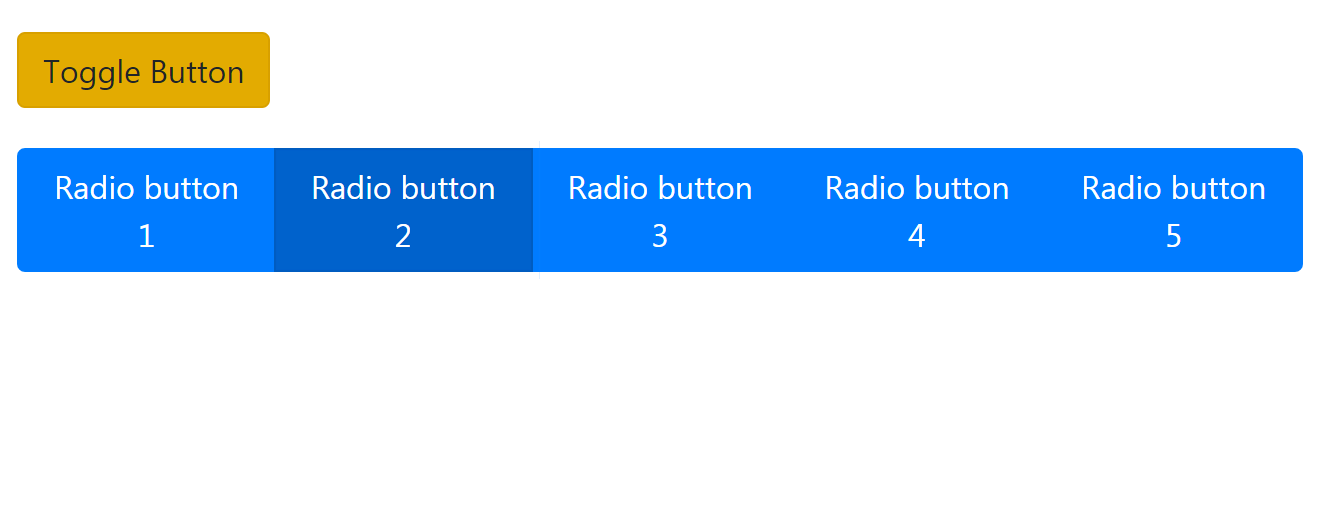
For example: A particular switch in our house can either be on or offThis is a very good example of a real life toggle switch,The WiFi or Bluetooth option in our phone is another example, that can either be on or off.
Example 1:
Create a radio button using Bootstrap.
<!DOCTYPE html>
<html lang="en">

<head>
    <meta charset="UTF-8">
    <meta name="viewport" content=
            "width=device-width, initial-scale=1.0">

    <title>Radio Button</title>
</head>

<body>
<div class="radio">
    <div class="btn-group btn-group-toggle"
         data-toggle="buttons">
        <label class="btn btn-primary">
            <input type="radio" name="button"
                   id="button1" autocomplete="off"
                   checked> Radio button 1
        </label>

        <label class="btn btn-primary active">
            <input type="radio" name="button"
                   id="button2" autocomplete="off">
            Radio button 2
        </label>

        <label class="btn btn-primary">
            <input type="radio" name="button"
                   id="button3" autocomplete="off">
            Radio button 3
        </label>

        <label class="btn btn-primary">
            <input type="radio" name="button"
                   id="button4" autocomplete="off">
            Radio button 4
        </label>

        <label class="btn btn-primary">
            <input type="radio" name="button"
                   id="button5" autocomplete="off">
            Radio button 5
        </label>
    </div>
</div>
</body>

</html>
<!DOCTYPE html>
<html>

<head>

    <!-- Latest compiled and minified CSS -->
    <link rel="stylesheet" href="https://maxcdn.bootstrapcdn.com/bootstrap/4.5.0/css/bootstrap.min.css">
    <!-- jQuery library -->
    <script src="https://ajax.googleapis.com/ajax/libs/jquery/3.5.1/jquery.min.js"></script>
    <!-- Popper JS -->
    <script src="https://cdnjs.cloudflare.com/ajax/libs/popper.js/1.16.0/umd/popper.min.js"></script>

    <!-- Latest compiled JavaScript -->
    <script src="https://maxcdn.bootstrapcdn.com/bootstrap/4.5.0/js/bootstrap.min.js"></script>
    <meta name="viewport" content="width=device-width, initial-scale=1">
    <link rel="stylesheet" type="text/css" href="style.css">
    <link href="https://stackpath.bootstrapcdn.com/font-awesome/4.7.0/css/font-awesome.min.css" rel="stylesheet">
    <link href="https://fonts.googleapis.com/css2?family=Lato:ital,wght@0,100;0,300;0,400;1,300&display=swap" rel="stylesheet"><script src="https://cdn.jsdelivr.net/npm/gijgo@1.8.1/combined/js/gijgo.min.js" type="text/javascript"></script>
    <link href="https://cdn.jsdelivr.net/npm/gijgo@1.8.1/combined/css/gijgo.min.js" rel="stylesheet" type="text/css">
    <link rel="stylesheet" type="text/css" href="css/lightbox.min.css">
    <script type="text/javascript" src="js/lightbox-plus-jquery.min.js"></script>
    <title>Buttons</title>

    <style>
        .toggle,
        .radio {
            margin: 20px;
        }
    </style>
</head>

<body>
<div class="toggle">
    <button type="button" class="btn btn-warning"data-toggle="button" autocomplete="off">Toggle Button</button>
</div>

<div class="radio">
    <div class="btn-group btn-group-toggle" data-toggle="buttons">
        <label class="btn btn-primary">
            <input type="radio" name="button" id="button1" autocomplete="off" checked> Radio button 1
        </label>

        <label class="btn btn-primary active">
            <input type="radio" name="button" id="button2" autocomplete="off">Radio button 2
        </label>

        <label class="btn btn-primary">
            <input type="radio" name="button" id="button3" autocomplete="off">
            Radio button 3
        </label>

        <label class="btn btn-primary">
            <input type="radio" name="button" id="button4" autocomplete="off">
            Radio button 4
        </label>

        <label class="btn btn-primary">
            <input type="radio" name="button" id="button5" autocomplete="off">
            Radio button 5
        </label>
    </div>
</div>
</body>

</html>