
 Posted By
Bajarangi soft ,
Posted On 16-10-2020
Posted By
Bajarangi soft ,
Posted On 16-10-2020
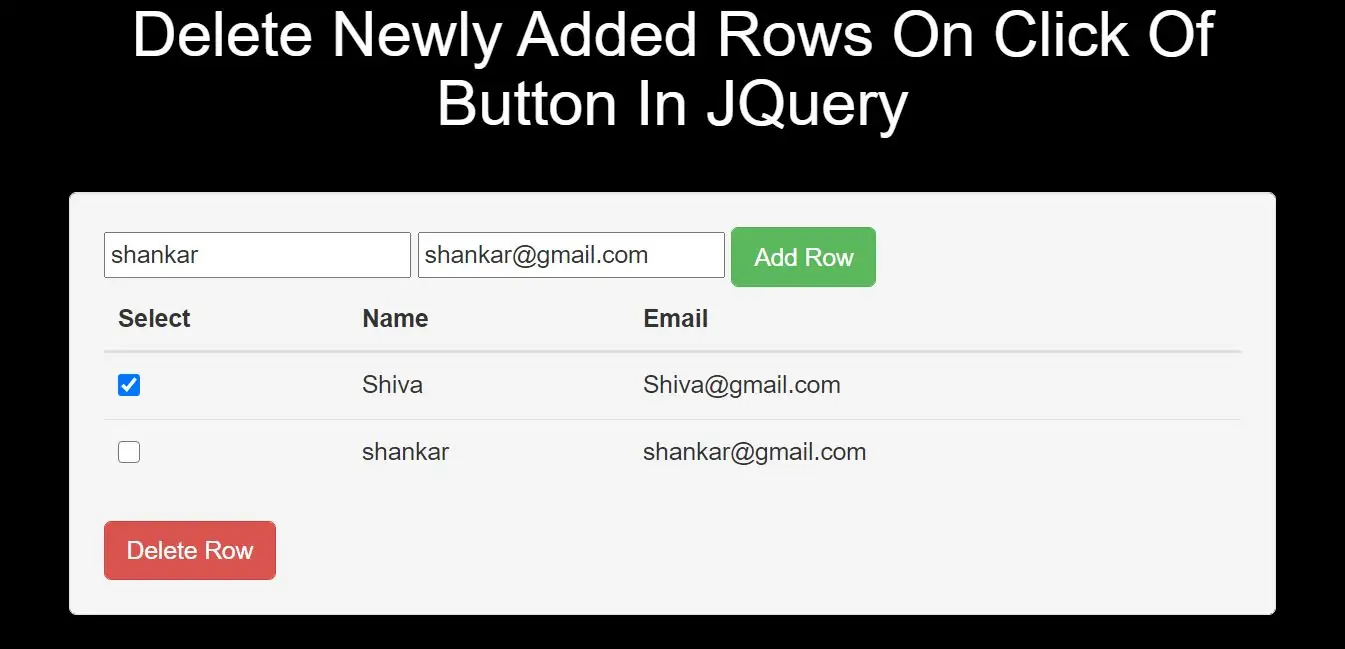
Step 1:Create index.html file and implement below code.
<table class="table">
    <thead>
    <tr>
        <th>Select</th>
        <th>Name</th>
        <th>Email</th>
    </tr>
    </thead>
    <tbody>
    <tr>
        <td><input type="checkbox" name="record"></td>
        <td>Shiva</td>
        <td>Shiva@gmail.com</td>
    </tr>
    </tbody>
</table>
<button type="button" class="btn btn-danger delete-row">Delete Row</button>
Step 2:Implement jQuery to delete newly added rows in table.
<script type="text/javascript">
    $(document).ready(function() {
        $(".add-row").click(function() {

                var name = $("#name").val();
                var email = $("#email").val();
                var markup = "<tr><td><input type='checkbox' name='record'></td><td>" + name + "</td><td>" + email + "</td></tr>";
                $("table tbody").append(markup);


        });
        /* Find and remove selected table rows */
        $(".delete-row").click(function() {
            $("table tbody").find('input[name="record"]').each(function() {
                if ($(this).is(":checked")) {
                    $(this).parents("tr").remove();
                }
            });
        });
    });
</script>
Complete Code For Deleting Newly Added Rows On Click Of Button In JQuery
<!DOCTYPE html>
<html>
<head>
    <title>How To Delete Newly Added Rows On Click Of Button In JQuery</title>
    <meta charset="utf-8">
    <meta name="viewport" content="width=device-width, initial-scale=1">
    <link rel="stylesheet" href="https://maxcdn.bootstrapcdn.com/bootstrap/3.4.1/css/bootstrap.min.css">
    <script src="https://ajax.googleapis.com/ajax/libs/jquery/3.5.1/jquery.min.js"></script>
</head>
<style>
    body {
        background: black;
    }
</style>
<body>
<div class="container">
    <br><br><br>
    <div class="text-center">
        <h1 id="color" style="color: White;">Delete Newly Added Rows On Click Of Button In JQuery</h1>
    </div>
    <br>
    <div class="col-md-2"></div>
    <div class="col-md-8">
        <div class="well">
            <form>
                <input type="text" id="name" placeholder="Name" required>
                <input type="text" id="email" placeholder="Email Address" required>
                <input type="button" class="btn btn-success add-row" value="Add Row">
            </form>
            <table class="table">
                <thead>
                <tr>
                    <th>Select</th>
                    <th>Name</th>
                    <th>Email</th>
                </tr>
                </thead>
                <tbody>
                <tr>
                    <td><input type="checkbox" name="record"></td>
                    <td>Shiva</td>
                    <td>Shiva@gmail.com</td>
                </tr>
                </tbody>
            </table>
            <button type="button" class="btn btn-danger delete-row">Delete Row</button>
            <script type="text/javascript">
                $(document).ready(function () {
                    $(".add-row").click(function () {

                        var name = $("#name").val();
                        var email = $("#email").val();
                        var markup = "<tr><td><input type='checkbox' name='record'></td><td>" + name + "</td><td>" + email + "</td></tr>";
                        $("table tbody").append(markup);


                    });
                    /* Find and remove selected table rows */
                    $(".delete-row").click(function () {
                        $("table tbody").find('input[name="record"]').each(function () {
                            if ($(this).is(":checked")) {
                                $(this).parents("tr").remove();
                            }
                        });
                    });
                });
            </script>
        </div>
    </div>
    <div class="col-md-2"></div>
</div>
</body>
</html>