
 Posted By
Bajarangi soft ,
Posted On 09-10-2020
Posted By
Bajarangi soft ,
Posted On 09-10-2020
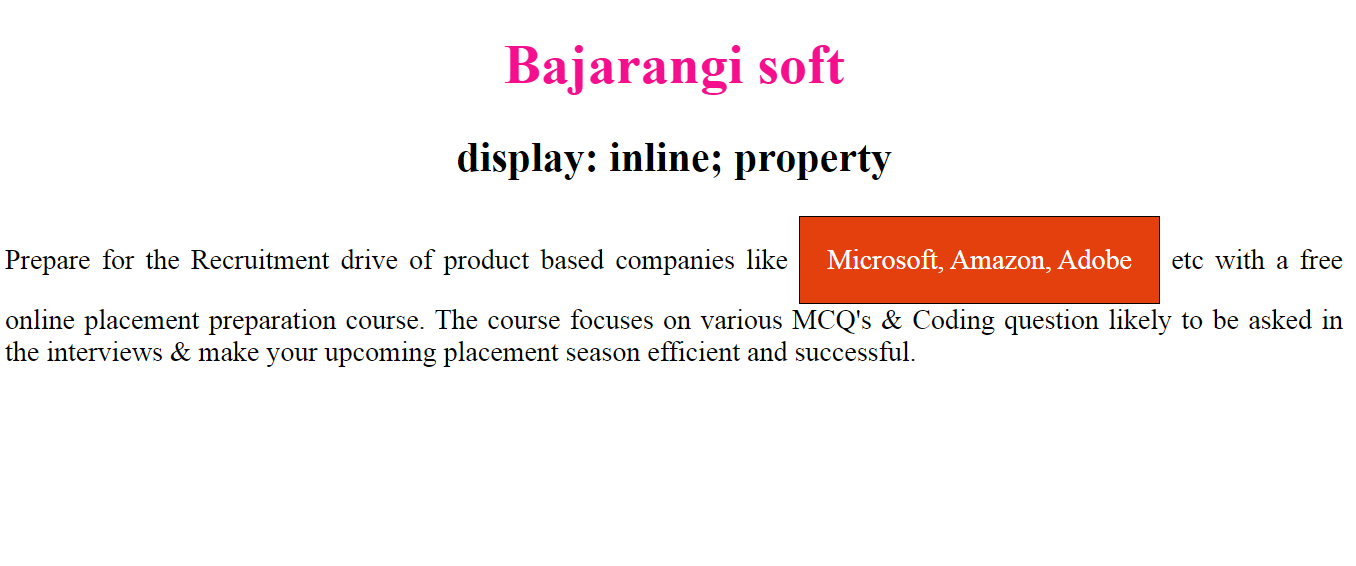
The display property in CSS is very useful and commonly used property which contains many values. This article contains display:inline and display:inline-block property.
Syntax1:
element {
    display: inline;
    // CSS property
}
<!DOCTYPE html>
<html>
<head>
    <title>display:inline; property</title>
    <style>
        p {
            color: green;
        }
        .gfg {
            display: inline;
            padding: 15px 15px;
            border: 1px solid black;
            color:white;
            background-color: #e3400e;
        }
        div {
            text-align:justify;
        }
        h1 {
            color: #f50f8d;
        }
        h1, h2 {
            text-align:center;
        }
    </style>
</head>
<body>
<h1>Bajarangi soft</h1>
<h2>display: inline; property</h2>
<div>Prepare for the Recruitment drive of product based
    companies like <span class = "gfg">Microsoft, Amazon,
      Adobe</span> etc with a free online placement preparation
    course. The course focuses on various MCQ's & Coding question
    likely to be asked in the interviews & make your upcoming
    placement season efficient and successful.
</div>
</body>
</html>
element {
    display: inline-block;
    // CSS property
}
<!DOCTYPE html>
<html>
<head>
    <title>display:inline; property</title>
    <style>
        p {
            color: green;
        }
        .gfg {
            display: inline-block;
            padding: 15px 15px;
            border: 1px solid black;
            color:white;
            background-color: #e3400e;
        }
        div {
            text-align:justify;
        }
        h1 {
            color: #f50f8d;
        }
        h1, h2 {
            text-align:center;
        }
    </style>
</head>
<body>
<h1>Bajarangi soft</h1>
<h2>display: inline; property</h2>
<div>Prepare for the Recruitment drive of product based
    companies like <span class = "gfg">Microsoft, Amazon,
      Adobe</span> etc with a free online placement preparation
    course. The course focuses on various MCQ's & Coding question
    likely to be asked in the interviews & make your upcoming
    placement season efficient and successful.
</div>
</body>
</html>