
 Posted By
Bajarangi soft ,
Posted On 09-10-2020
Posted By
Bajarangi soft ,
Posted On 09-10-2020
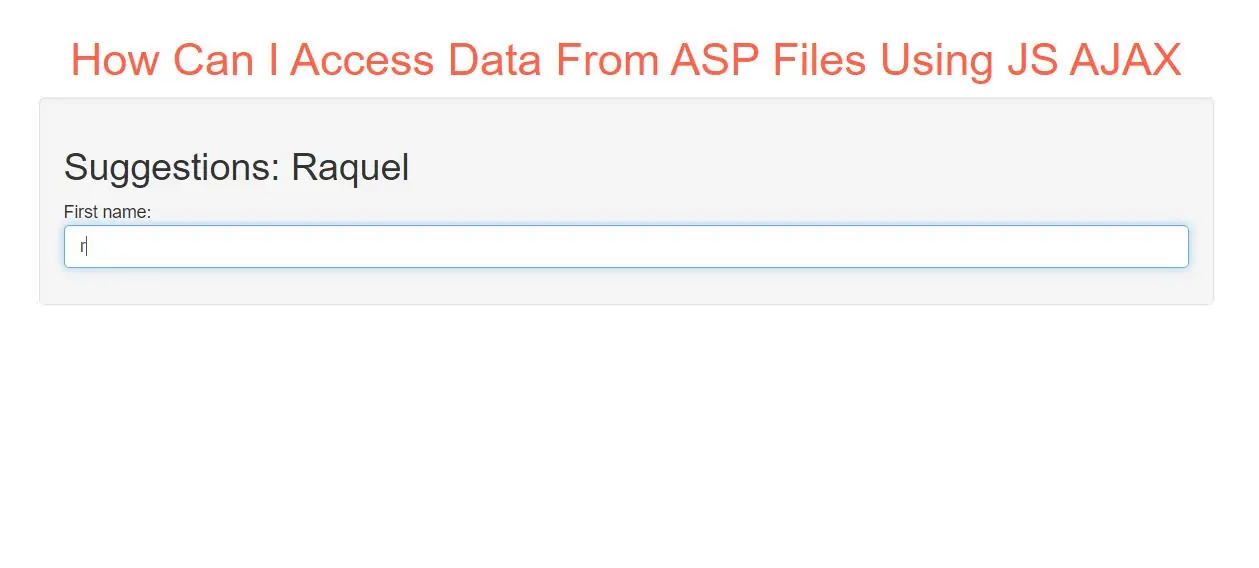
Step 1:
Create index.html and implement below code.
<h2>Suggestions: <span id="demo"></span></h2>

<p>First name: <input class="form-control" type="text" id="txt1" onkeyup="showHint(this.value)"></p>
Step 2:
Create asp file as getdata.asp file and implement below code in it.
<%
response.expires=-1
dim a(30)
'Fill up array with names
a(1)="Anna"
a(2)="Brittany"
a(3)="Cinderella"
a(4)="Diana"
a(5)="Eva"
a(6)="Fiona"
a(7)="Gunda"
a(8)="Hege"
a(9)="Inga"
a(10)="Johanna"
a(11)="Kitty"
a(12)="Linda"
a(13)="Nina"
a(14)="Ophelia"
a(15)="Petunia"
a(16)="Amanda"
a(17)="Raquel"
a(18)="Cindy"
a(19)="Doris"
a(20)="Eve"
a(21)="Evita"
a(22)="Sunniva"
a(23)="Tove"
a(24)="Unni"
a(25)="Violet"
a(26)="Liza"
a(27)="Elizabeth"
a(28)="Ellen"
a(29)="Wenche"
a(30)="Vicky"

'get the q parameter from URL
q=ucase(request.querystring("q"))

'lookup all hints from array if length of q>0
if len(q)>0 then
  hint=""
  for i=1 to 30
    if q=ucase(mid(a(i),1,len(q))) then
      if hint="" then
        hint=a(i)
      else
        hint=hint & " , " & a(i)
      end if
    end if
  next
end if

'Output "no suggestion" if no hint were found
'or output the correct values
if hint="" then
  response.write("no suggestion")
else
  response.write(hint)
end if
%>
Step 3:
Now Implement java script to access asp file data.
<script>
    function showHint(str) {
        var xhttp;
        if (str.length == 0) {
            document.getElementById("txtHint").innerHTML = "";
            return;
        }
        xhttp = new XMLHttpRequest();
        xhttp.onreadystatechange = function() {
            if (this.readyState == 4 && this.status == 200) {
                document.getElementById("demo").innerHTML = this.responseText;
            }
        };
        xhttp.open("GET", "gethint.asp?q="+str, true);
        xhttp.send();
    }
</script>
Code explanation:
First, check if the input field is empty (str.length == 0). If it is, clear the content of the txtHint placeholder and exit the function.
However, if the input field is not empty, do the following:
Complete Code For Accessing Data From ASP Files Using JS AJAX
<!DOCTYPE html>
<html>
<head>
    <title>How Can I Access Data From ASP Files Using JS AJAX</title>
    <meta charset="utf-8">
    <meta name="viewport" content="width=device-width, initial-scale=1">
    <link rel="stylesheet" href="https://maxcdn.bootstrapcdn.com/bootstrap/3.4.1/css/bootstrap.min.css">
</head>

<body>
<div class="container">
    <br>
    <div class="text-center">
        <h1 id="color" style="color: tomato">How Can I Access Data From ASP Files Using JS AJAX</h1>
    </div>
    <div class="well">
        <h2>Suggestions: <span id="demo"></span></h2>

        <p>First name: <input class="form-control" type="text" id="txt1" onkeyup="showHint(this.value)"></p>

        <script>
            function showHint(str) {
                var xhttp;
                if (str.length == 0) {
                    document.getElementById("txtHint").innerHTML = "";
                    return;
                }
                xhttp = new XMLHttpRequest();
                xhttp.onreadystatechange = function() {
                    if (this.readyState == 4 && this.status == 200) {
                        document.getElementById("demo").innerHTML = this.responseText;
                    }
                };
                xhttp.open("GET", "getdata.php?q="+str, true);
                xhttp.send();
            }
        </script>

    </div>
</div>
</body>
</html>