
 Posted By
Bajarangi soft ,
Posted On 01-10-2020
Posted By
Bajarangi soft ,
Posted On 01-10-2020
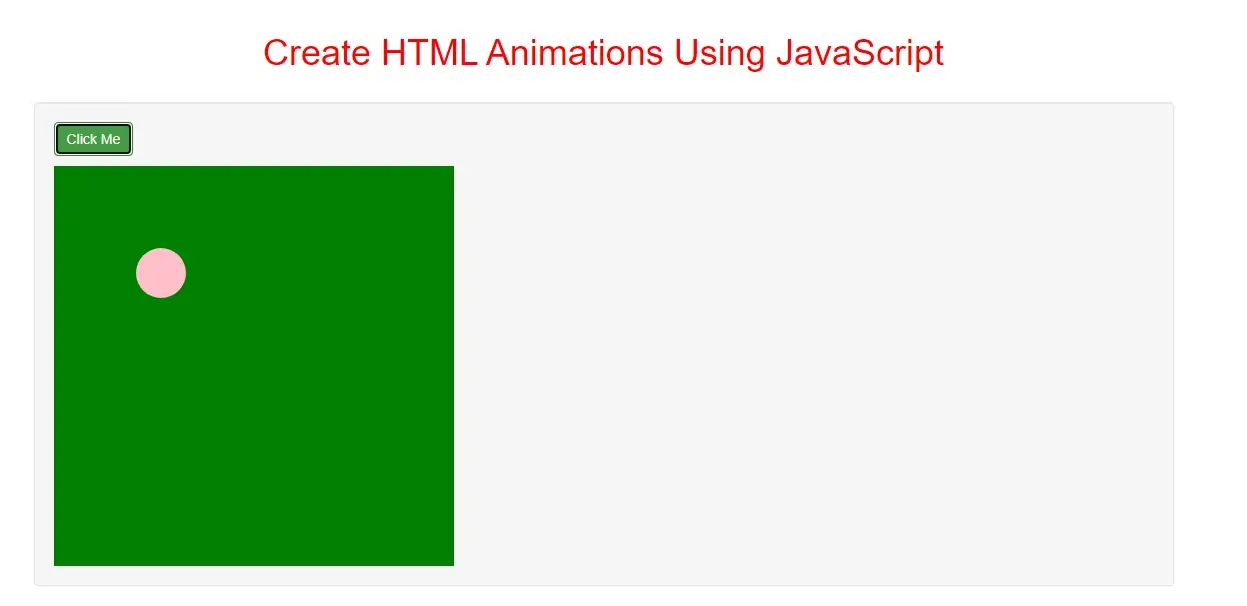
The Animation Code
JavaScript animations are done by programming gradual changes in an element's style.
The changes are called by a timer. When the timer interval is small, the animation looks continuous.
The basic code is:
Step 1: create index.html file implement html code as below in it.
<!DOCTYPE html>
<html>
<body>

<h1>Animation</h1>

<div id ="Container">
    <div id ="Animation"></div>
</div>

</body>
<html>
Step 2:Create css as below code implement for create div elements.
#Container {
    width: 400px;
    height: 400px;
    position: relative;
    background: green;
}
#Animation {
    width: 50px;
    height: 50px;
    position: absolute;
    background-color: pink;
    border-radius: 50px;
}
Step 3:The basic code to move div.
var id = setInterval(frame, 5);

function frame() {
  if (/* test for finished */) {
    clearInterval(id);
    } else {
     /* code to change the element style */
    }
  }
function Move_ball() {
    var element = document.getElementById("Animation");
    var pos = 0;
    var id = setInterval(frame, 10);
    function frame() {
        if (pos == 350) {
            clearInterval(id);
        } else {
            pos++;
            element.style.top = pos + 'px';
            element.style.left = pos + 'px';
        }
    }
}
Now we create complete code for animation with java script.
<!DOCTYPE html>
<html>
<head>
    <title>How Can I Create HTML  Animations Using JavaScript</title>
    <meta charset="utf-8">
    <meta name="viewport" content="width=device-width, initial-scale=1">
    <link rel="stylesheet" href="https://maxcdn.bootstrapcdn.com/bootstrap/3.4.1/css/bootstrap.min.css">
</head>
<style>
    h1{
        color:red;
    }
    #Container {
        width: 400px;
        height: 400px;
        position: relative;
        background: green;
    }
    #Animation {
        width: 50px;
        height: 50px;
        position: absolute;
        background-color: pink;
        border-radius: 50px;
    }
</style>
<body>
<div class="container">
    <br>
    <br>
    <div class="text-center">
        <h1>Create HTML  Animations Using JavaScript</h1>
    </div>
    <br>
        <div class="well">
            <p>
                <button class="btn btn-success" onclick="Move_ball()">Click Me</button>
            </p>

            <div id ="Container">
                <div id ="Animation">.....div</div>
            </div>

        </div>
    <div>
</body>
</html>
<script>
    function Move_ball() {
        var element = document.getElementById("Animation");
        var pos = 0;
        var id = setInterval(frame, 10);
        function frame() {
            if (pos == 350) {
                clearInterval(id);
            } else {
                pos++;
                element.style.top = pos + 'px';
                element.style.left = pos + 'px';
            }
        }
    }

</script>