
 Posted By
Bajarangi soft ,
Posted On 05-10-2020
Posted By
Bajarangi soft ,
Posted On 05-10-2020
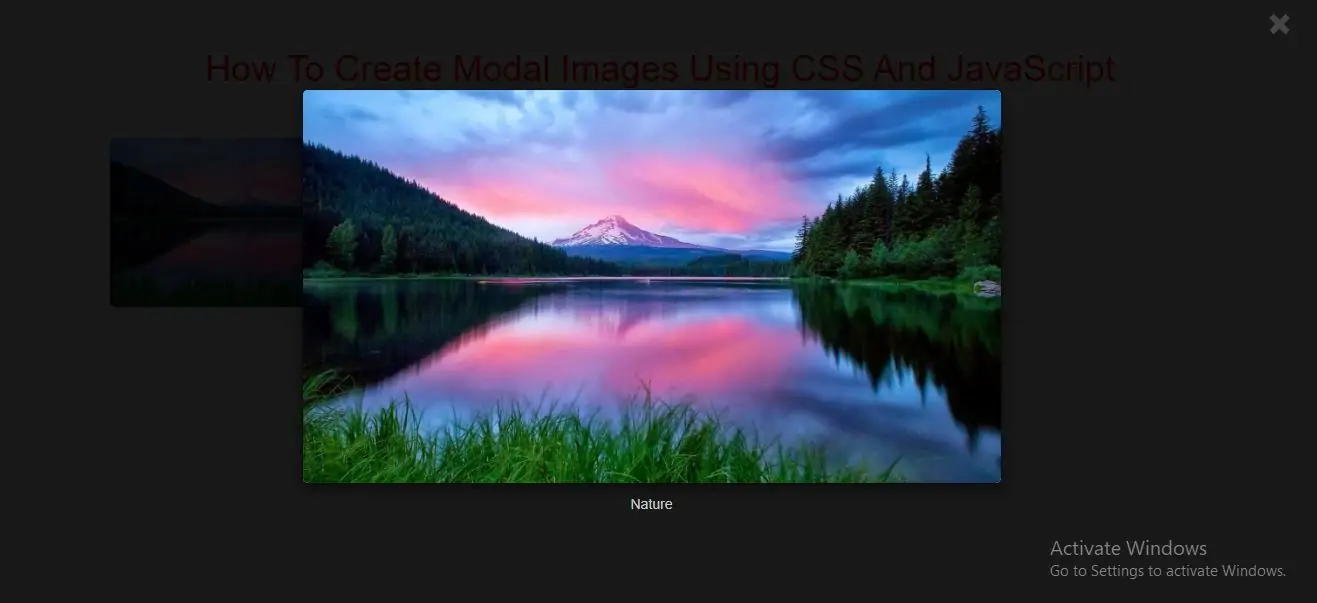
Modal Image
A modal is a dialog box/popup window that is displayed on top of the current page.
Step 1: Create index.html file and implement below code in it.
<img id="Img" src="../image/demo5.jpg" alt="Nature" style="width:100%;max-width:300px">
<!-- The Modal -->
<div id="Modal" class="modal">
<span class="close">×</span>
<img class="modal-content" id="img01">
<div id="caption"></div>
</div>
Step 2:Now we create css code to display images so implement below code in index.html file
<style>
    body {font-family: Arial, Helvetica, sans-serif;}

    #Img {
        border-radius: 5px;
        cursor: pointer;
        transition: 0.3s;
    }

    #Img:hover {opacity: 0.7;}

    /* The Modal (background) */
    .modal {
        display: none; /* Hidden by default */
        position: fixed; /* Stay in place */
        z-index: 1; /* Sit on top */
        padding-top: 100px; /* Location of the box */
        left: 0;
        top: 0;
        width: 100%; /* Full width */
        height: 100%; /* Full height */
        overflow: auto; /* Enable scroll if needed */
        background-color: rgb(0,0,0); /* Fallback color */
        background-color: rgba(0,0,0,0.9); /* Black w/ opacity */
    }

    /* Modal Content (image) */
    .modal-content {
        margin: auto;
        display: block;
        width: 80%;
        max-width: 700px;
    }

    /* Caption of Modal Image */
    #caption {
        margin: auto;
        display: block;
        width: 80%;
        max-width: 700px;
        text-align: center;
        color: #ccc;
        padding: 10px 0;
        height: 150px;
    }

    /* Add Animation */
    .modal-content, #caption {
        -webkit-animation-name: zoom;
        -webkit-animation-duration: 0.6s;
        animation-name: zoom;
        animation-duration: 0.6s;
    }

    @-webkit-keyframes zoom {
        from {-webkit-transform:scale(0)}
        to {-webkit-transform:scale(1)}
    }

    @keyframes zoom {
        from {transform:scale(0)}
        to {transform:scale(1)}
    }

    /* The Close Button */
    .close {
        position: absolute;
        top: 15px;
        right: 35px;
        color: #f1f1f1;
        font-size: 40px;
        font-weight: bold;
        transition: 0.3s;
    }

    .close:hover,
    .close:focus {
        color: #bbb;
        text-decoration: none;
        cursor: pointer;
    }

    /* 100% Image Width on Smaller Screens */
    @media only screen and (max-width: 700px){
        .modal-content {
            width: 100%;
        }
    }
</style>
Step 3:Now we implement javascript to modal image .
<script>
    // Get the modal
    var modal = document.getElementById("Modal");

    // Get the image and insert it inside the modal - use its "alt" text as a caption
    var img = document.getElementById("Img");
    var modalImg = document.getElementById("img01");
    var captionText = document.getElementById("caption");
    img.onclick = function(){
        modal.style.display = "block";
        modalImg.src = this.src;
        captionText.innerHTML = this.alt;
    }

    // Get the <span> element that closes the modal
    var span = document.getElementsByClassName("close")[0];

    // When the user clicks on <span> (x), close the modal
    span.onclick = function() {
        modal.style.display = "none";
    }
</script>
<!DOCTYPE html>
<html>
<head>
<title>How To Create Modal Images Using CSS And JavaScript</title>
<meta charset="utf-8">
<meta name="viewport" content="width=device-width, initial-scale=1">
<link rel="stylesheet" href="https://maxcdn.bootstrapcdn.com/bootstrap/3.4.1/css/bootstrap.min.css">
</head>
<style>
h1 {
color: red;
text-align: center;
}
</style>
<style>
body {
font-family: Arial, Helvetica, sans-serif;
}
#Img {
border-radius: 5px;
cursor: pointer;
transition: 0.3s;
}
#Img:hover {
opacity: 0.7;
}
/* The Modal (background) */
.modal {
display: none; /* Hidden by default */
position: fixed; /* Stay in place */
z-index: 1; /* Sit on top */
padding-top: 100px; /* Location of the box */
left: 0;
top: 0;
width: 100%; /* Full width */
height: 100%; /* Full height */
overflow: auto; /* Enable scroll if needed */
background-color: rgb(0, 0, 0); /* Fallback color */
background-color: rgba(0, 0, 0, 0.9); /* Black w/ opacity */
}
/* Modal Content (image) */
.modal-content {
margin: auto;
display: block;
width: 80%;
max-width: 700px;
}
/* Caption of Modal Image */
#caption {
margin: auto;
display: block;
width: 80%;
max-width: 700px;
text-align: center;
color: #ccc;
padding: 10px 0;
height: 150px;
}
/* Add Animation */
.modal-content, #caption {
-webkit-animation-name: zoom;
-webkit-animation-duration: 0.6s;
animation-name: zoom;
animation-duration: 0.6s;
}
@-webkit-keyframes zoom {
from {
-webkit-transform: scale(0)
}
to {
-webkit-transform: scale(1)
}
}
@keyframes zoom {
from {
transform: scale(0)
}
to {
transform: scale(1)
}
}
/* The Close Button */
.close {
position: absolute;
top: 15px;
right: 35px;
color: #f1f1f1;
font-size: 40px;
font-weight: bold;
transition: 0.3s;
}
.close:hover,
.close:focus {
color: #bbb;
text-decoration: none;
cursor: pointer;
}
/* 100% Image Width on Smaller Screens */
@media only screen and (max-width: 700px) {
.modal-content {
width: 100%;
}
}
</style>
<body>
<div class="container">
<br>
<br>
<div class="text-center">
<h1>How To Create Modal Images Using CSS And JavaScript</h1>
</div>
<br>
<div class="well">
<img id="Img" src="../image/demo5.jpg" alt="Nature" style="width:100%;max-width:300px">
<!-- The Modal -->
<div id="Modal" class="modal">
<span class="close">×</span>
<img class="modal-content" id="img01">
<div id="caption"></div>
</div>
<script>
// Get the modal
var modal = document.getElementById("Modal");
// Get the image and insert it inside the modal - use its "alt" text as a caption
var img = document.getElementById("Img");
var modalImg = document.getElementById("img01");
var captionText = document.getElementById("caption");
img.onclick = function () {
modal.style.display = "block";
modalImg.src = this.src;
captionText.innerHTML = this.alt;
}
// Get the <span> element that closes the modal
var span = document.getElementsByClassName("close")[0];
// When the user clicks on <span> (x), close the modal
span.onclick = function () {
modal.style.display = "none";
}
</script>
</div>
<div>
</body>
</html>