
 Posted By
Bajarangi soft ,
Posted On 08-10-2020
Posted By
Bajarangi soft ,
Posted On 08-10-2020
Step 1:
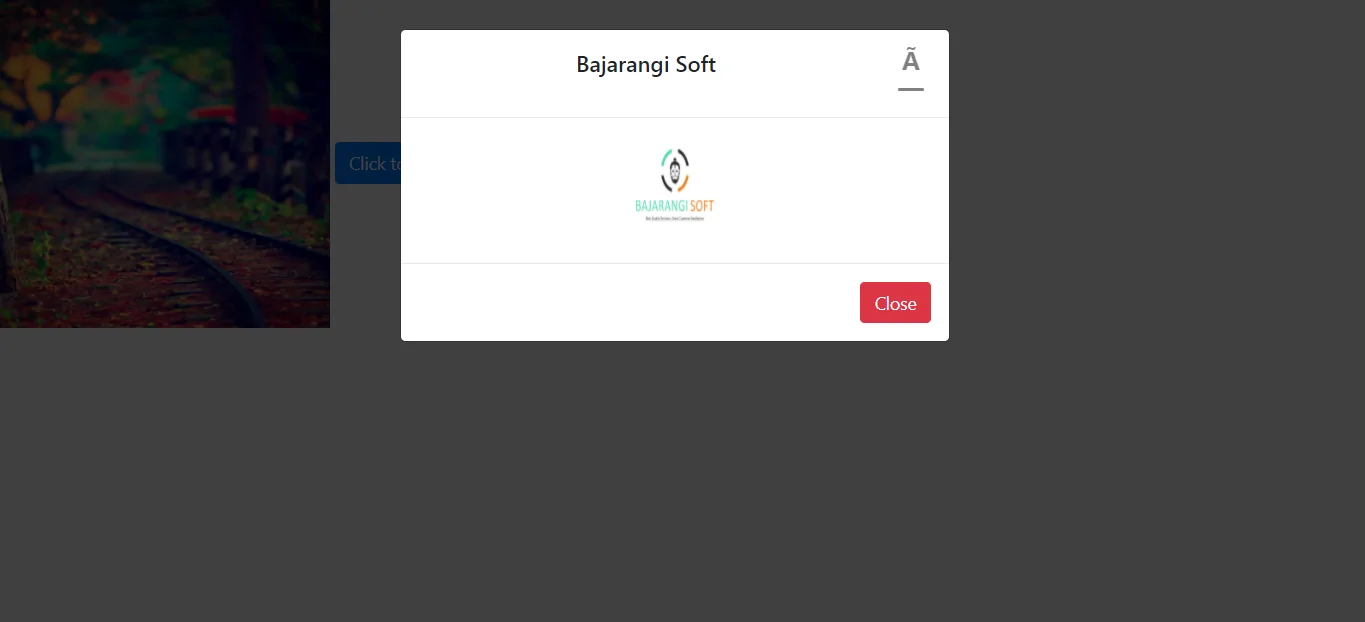
Images can be fitted in modal popup using Bootstrap by including <img> tag in the “modal-body” div. The “modal-body” div determines the main content of modal popup. By using the <img> tag, an image can be inserted into it.
This is illustrated in the following example:
Example 1:
<!DOCTYPE html>
<html>
<head>
    <link rel="stylesheet" href="https://stackpath.bootstrapcdn.com/bootstrap/4.1.3/css/bootstrap.min.css" integrity="sha384-MCw98/SFnGE8fJT3GXwEOngsV7Zt27NXFoaoApmYm81iuXoPkFOJwJ8ERdknLPMO" crossorigin="anonymous" />
</head>

<body>
<button type="button"
        class="btn btn-primary"
        data-toggle="modal"
        data-target="#exampleModal">
    Click to view modal
</button>

<!--Bootstrap modal -->
<div class="modal fade"
     id="exampleModal"
     tabindex="-1"
     role="dialog"
     aria-labelledby="exampleModalLabel"
     aria-hidden="true">
    <div class="modal-dialog"
         role="document">
        <div class="modal-content">
            <!-- Modal heading -->
            <div class="modal-header">
                <h5 class="modal-title"
                    id="exampleModalLabel">
                   Bajarangi Soft
                </h5>
                <button type="button"
                        class="close"
                        data-dismiss="modal"
                        aria-label="Close">
                     <span aria-hidden="true">
                     ×
                  </span>
                </button>
            </div>

            <!-- Modal body with image -->
            <div class="modal-body">
                <img src="logo.jpg" style="width:100px;height:100px;" />
            </div>
        </div>
    </div>
</div>

<script src="https://code.jquery.com/jquery-3.3.1.slim.min.js" integrity="sha384-q8i/X+965DzO0rT7abK41JStQIAqVgRVzpbzo5smXKp4YfRvH+8abtTE1Pi6jizo" crossorigin="anonymous"></script>
<script src="https://cdnjs.cloudflare.com/ajax/libs/popper.js/1.14.3/umd/popper.min.js" integrity="sha384-ZMP7rVo3mIykV+2+9J3UJ46jBk0WLaUAdn689aCwoqbBJiSnjAK/l8WvCWPIPm49" crossorigin="anonymous"></script>
<script src="https://stackpath.bootstrapcdn.com/bootstrap/4.1.3/js/bootstrap.min.js" integrity="sha384-ChfqqxuZUCnJSK3+MXmPNIyE6ZbWh2IMqE241rYiqJxyMiZ6OW/JmZQ5stwEULTy" crossorigin="anonymous"></script>
</body>
</html>
<!DOCTYPE html>
<html>
<head>
    <link rel="stylesheet"
          href=
                  "https://stackpath.bootstrapcdn.com/bootstrap/4.1.3/css/bootstrap.min.css"
          integrity=
                  "sha384-MCw98/SFnGE8fJT3GXwEOngsV7Zt27NXFoaoApmYm81iuXoPkFOJwJ8ERdknLPMO"
          crossorigin="anonymous" />

    <style>
        /* Content of modal div is center aligned */
        .modal {
            text-align: center;
        }
    </style>
</head>

<body>
<img src="b1.jpg"
     data-toggle="modal"
     data-target="#exampleModal" style="width:300px;height:300px;" />

<div class="modal fade"
     id="exampleModal"
     tabindex="-1"
     role="dialog"
     aria-labelledby="exampleModalLabel"
     aria-hidden="true">
    <div class="modal-dialog"
         role="document">
        <div class="modal-content">
            <div class="modal-header">
                <!-- w-100 class so that header
        div covers 100% width of parent div -->
                <h5 class="modal-title w-100"
                    id="exampleModalLabel">
                   Bajarangi Soft
                </h5>
                <button type="button"
                        class="close"
                        data-dismiss="modal"
                        aria-label="Close">
                     <span aria-hidden="true">
                     ×
                  </span>
                </button>
            </div>

            <!--Modal body with image-->
            <div class="modal-body">
                <img src="logo.jpg" style="width:100px; height:100px;"/>
            </div>

            <div class="modal-footer">
                <button type="button"
                        class="btn btn-danger"
                        data-dismiss="modal">
                    Close
                </button>
            </div>
        </div>
    </div>
</div>

<script src="https://code.jquery.com/jquery-3.3.1.slim.min.js" i ntegrity="sha384-q8i/X+965DzO0rT7abK41JStQIAqVgRVzpbzo5smXKp4YfRvH+8abtTE1Pi6jizo" crossorigin="anonymous"></script>
<script src="https://cdnjs.cloudflare.com/ajax/libs/popper.js/1.14.3/umd/popper.min.js" integrity="sha384-ZMP7rVo3mIykV+2+9J3UJ46jBk0WLaUAdn689aCwoqbBJiSnjAK/l8WvCWPIPm49" crossorigin="anonymous"></script>
<script src="https://stackpath.bootstrapcdn.com/bootstrap/4.1.3/js/bootstrap.min.js" integrity="sha384-ChfqqxuZUCnJSK3+MXmPNIyE6ZbWh2IMqE241rYiqJxyMiZ6OW/JmZQ5stwEULTy" crossorigin="anonymous"></script>
</body>
</html>