
 Posted By
Bajarangi soft ,
Posted On 06-10-2020
Posted By
Bajarangi soft ,
Posted On 06-10-2020
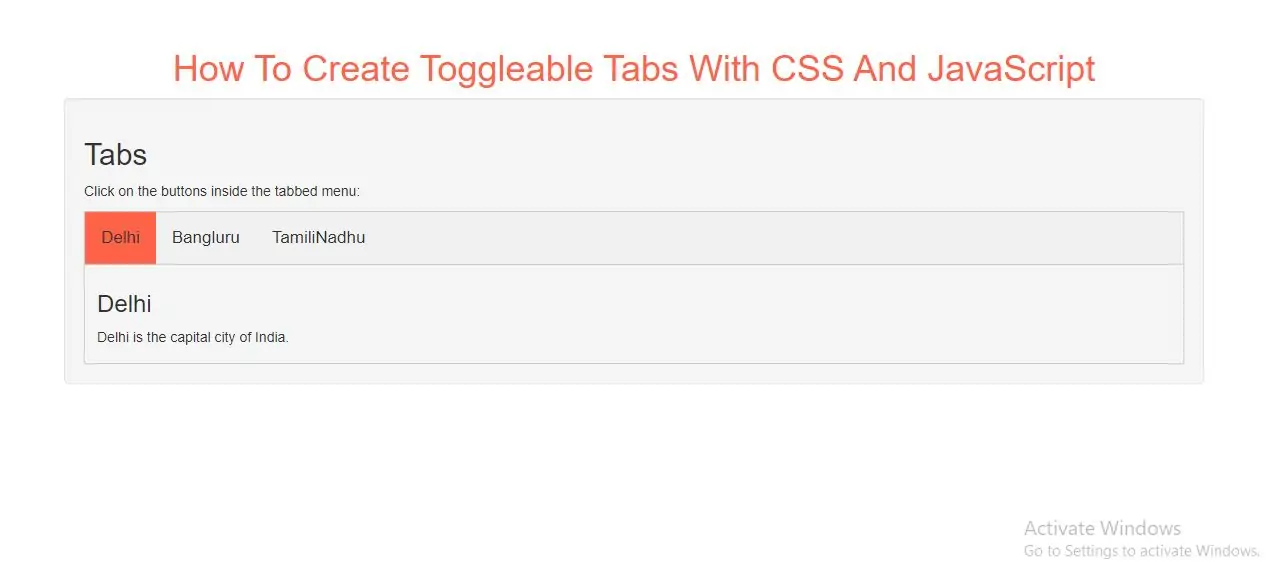
Create Toggleable Tabs
Step 1: Create index.html and implement below code.
<div class="tab">
    <button class="tablinks" onclick="openCity(event, 'Delhi')">Delhi</button>
    <button class="tablinks" onclick="openCity(event, 'Bangluru')">Bangluru</button>
    <button class="tablinks" onclick="openCity(event, 'TamilNadhu')">TamiliNadhu</button>
</div>

<div id="Delhi" class="tabcontent">
    <h3>Delhi</h3>
    <p>Delhi is the capital city of India.</p>
</div>

<div id="Bangluru" class="tabcontent">
    <h3>Bangluru</h3>
    <p>Bangluru is the Silicon city.</p>
</div>

<div id="TamilNadhu" class="tabcontent">
    <h3>TamilNadhu</h3>
    <p>TamilNadhu is Temple city.</p>
</div>
Step 2: Now implement CSS code to display tab content.
<style>
    h1{
        color:tomato;
    }
    body {font-family: Arial;}

    /* Style the tab */
    .tab {
        overflow: hidden;
        border: 1px solid #ccc;
        background-color: #f1f1f1;
    }

    /* Style the buttons inside the tab */
    .tab button {
        background-color: inherit;
        float: left;
        border: none;
        outline: none;
        cursor: pointer;
        padding: 14px 16px;
        transition: 0.3s;
        font-size: 17px;
    }

    /* Change background color of buttons on hover */
    .tab button:hover {
        background-color: #ddd;
    }

    /* Create an active/current tablink class */
    .tab button.active {
        background-color: tomato;
    }

    /* Style the tab content */
    .tabcontent {
        display: none;
        padding: 6px 12px;
        border: 1px solid #ccc;
        border-top: none;
    }
</style>
Step 3: Now Implement java script to open tabs content.
<script>
    function openCity(evt, cityName) {
        var i, tabcontent, tablinks;
        tabcontent = document.getElementsByClassName("tabcontent");
        for (i = 0; i < tabcontent.length; i++) {
            tabcontent[i].style.display = "none";
        }
        tablinks = document.getElementsByClassName("tablinks");
        for (i = 0; i < tablinks.length; i++) {
            tablinks[i].className = tablinks[i].className.replace(" active", "");
        }
        document.getElementById(cityName).style.display = "block";
        evt.currentTarget.className += " active";
    }
</script>
If you want to fade in the tab content, implement below CSS code:
.tabcontent {
animation: fadeEffect 1s; /* Fading effect takes 1 second */
}

/* Go from zero to full opacity */
@keyframes fadeEffect {
from {opacity: 0;}
to {opacity: 1;}
}
To open a specific tab on page load, use JavaScript to "click" on the specified tab button:
<button class="tablinks" onclick="openCity(event, 'Bangluru')" id="defaultOpen">Bangluru</button>

<script>
    // Get the element with id="defaultOpen" and click on it
    document.getElementById("defaultOpen").click();
</script>
Complete Code For Creating Toggleable Tabs With CSS And JavaScript
<!DOCTYPE html>
<html>
<head>
    <title>How To Create Toggleable Tabs With CSS And JavaScript</title>
    <meta charset="utf-8">
    <meta name="viewport" content="width=device-width, initial-scale=1">
    <link rel="stylesheet" href="https://maxcdn.bootstrapcdn.com/bootstrap/3.4.1/css/bootstrap.min.css">
</head>
<style>
    h1{
        color:tomato;
    }
    body {font-family: Arial;}

    /* Style the tab */
    .tab {
        overflow: hidden;
        border: 1px solid #ccc;
        background-color: #f1f1f1;
    }

    /* Style the buttons inside the tab */
    .tab button {
        background-color: inherit;
        float: left;
        border: none;
        outline: none;
        cursor: pointer;
        padding: 14px 16px;
        transition: 0.3s;
        font-size: 17px;
    }

    /* Change background color of buttons on hover */
    .tab button:hover {
        background-color: #ddd;
    }

    /* Create an active/current tablink class */
    .tab button.active {
        background-color: tomato;
    }

    /* Style the tab content */
    .tabcontent {
        display: none;
        padding: 6px 12px;
        border: 1px solid #ccc;
        border-top: none;
    }
</style>
<body>
<div class="container">
    <br>
    <br>
    <br>
    <div class="text-center">
        <h1>How To Create Toggleable Tabs With CSS And JavaScript</h1>
    </div>
    <div class="well">
        <h2>Tabs</h2>
        <p>Click on the buttons inside the tabbed menu:</p>

        <div class="tab">
            <button class="tablinks" onclick="openCity(event, 'Delhi')">Delhi</button>
            <button class="tablinks" onclick="openCity(event, 'Bangluru')">Bangluru</button>
            <button class="tablinks" onclick="openCity(event, 'TamilNadhu')">TamiliNadhu</button>
        </div>

        <div id="Delhi" class="tabcontent">
            <h3>Delhi</h3>
            <p>Delhi is the capital city of India.</p>
        </div>

        <div id="Bangluru" class="tabcontent">
            <h3>Bangluru</h3>
            <p>Bangluru is the Silicon city.</p>
        </div>

        <div id="TamilNadhu" class="tabcontent">
            <h3>TamilNadhu</h3>
            <p>TamilNadhu is Temple city.</p>
        </div>

        <script>
            function openCity(evt, cityName) {
                var i, tabcontent, tablinks;
                tabcontent = document.getElementsByClassName("tabcontent");
                for (i = 0; i < tabcontent.length; i++) {
                    tabcontent[i].style.display = "none";
                }
                tablinks = document.getElementsByClassName("tablinks");
                for (i = 0; i < tablinks.length; i++) {
                    tablinks[i].className = tablinks[i].className.replace(" active", "");
                }
                document.getElementById(cityName).style.display = "block";
                evt.currentTarget.className += " active";
            }
        </script>
    </div>
    <div>
</body>
</html>