
 Posted By
Bajarangi soft ,
Posted On 01-10-2020
Posted By
Bajarangi soft ,
Posted On 01-10-2020
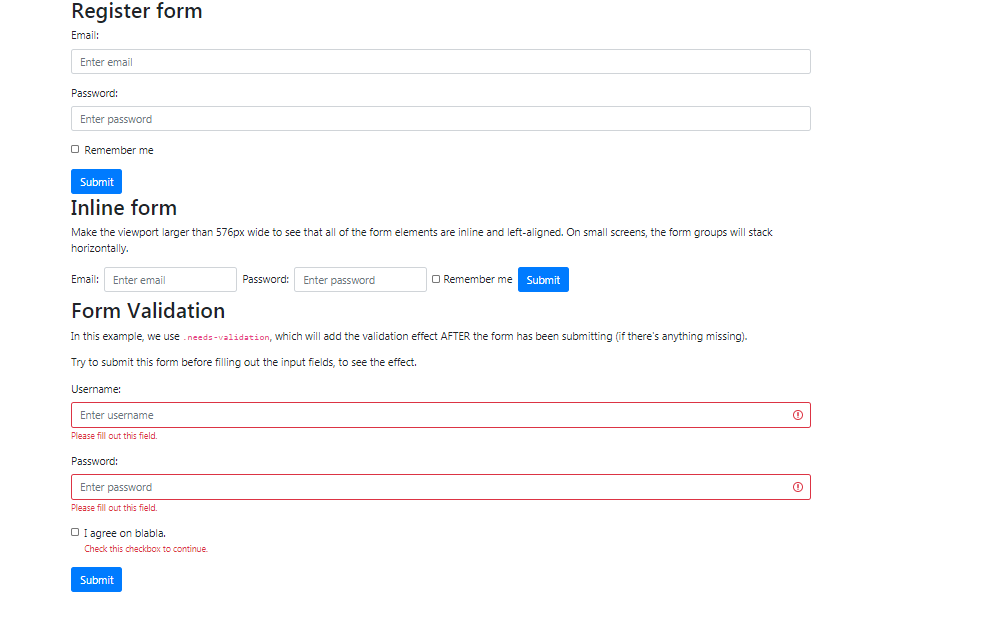
1.Basic Bootstrap Form
<!DOCTYPE html>
<html lang="en">
<head>
    <title>Bootstrap Example</title>
    <meta charset="utf-8">
    <meta name="viewport" content="width=device-width, initial-scale=1">
    <link rel="stylesheet" href="https://maxcdn.bootstrapcdn.com/bootstrap/4.5.2/css/bootstrap.min.css">
    <script src="https://ajax.googleapis.com/ajax/libs/jquery/3.5.1/jquery.min.js"></script>
    <script src="https://cdnjs.cloudflare.com/ajax/libs/popper.js/1.16.0/umd/popper.min.js"></script>
    <script src="https://maxcdn.bootstrapcdn.com/bootstrap/4.5.2/js/bootstrap.min.js"></script>
</head>
<body>

<div class="container">
    <h2>Register form</h2>
    <form action="/action_page.php">
        <div class="form-group">
            <label for="email">Email:</label>
            <input type="email" class="form-control" id="email" placeholder="Enter email" name="email">
        </div>
        <div class="form-group">
            <label for="pwd">Password:</label>
            <input type="password" class="form-control" id="pwd" placeholder="Enter password" name="pswd">
        </div>
        <div class="form-group form-check">
            <label class="form-check-label">
                <input class="form-check-input" type="checkbox" name="remember"> Remember me
            </label>
        </div>
        <button type="submit" class="btn btn-primary">Submit</button>
    </form>
</div>

</body>
</html>
!DOCTYPE html>
<html lang="en">
<head>
    <title>Bootstrap Example</title>
    <meta charset="utf-8">
    <meta name="viewport" content="width=device-width, initial-scale=1">
    <link rel="stylesheet" href="https://maxcdn.bootstrapcdn.com/bootstrap/4.5.2/css/bootstrap.min.css">
    <script src="https://ajax.googleapis.com/ajax/libs/jquery/3.5.1/jquery.min.js"></script>
    <script src="https://cdnjs.cloudflare.com/ajax/libs/popper.js/1.16.0/umd/popper.min.js"></script>
    <script src="https://maxcdn.bootstrapcdn.com/bootstrap/4.5.2/js/bootstrap.min.js"></script>
</head>
<body>

<div class="container">
    <h2>Inline form</h2>
    <p>Make the viewport larger than 576px wide to see that all of the form elements are inline and left-aligned. On small screens, the form groups will stack horizontally.</p>
    <form class="form-inline" action="/action_page.php">
        <label for="email2" class="mb-2 mr-sm-2">Email:</label>
        <input type="text" class="form-control mb-2 mr-sm-2" id="email2" placeholder="Enter email" name="email">
        <label for="pwd2" class="mb-2 mr-sm-2">Password:</label>
        <input type="text" class="form-control mb-2 mr-sm-2" id="pwd2" placeholder="Enter password" name="pswd">
        <div class="form-check mb-2 mr-sm-2">
            <label class="form-check-label">
                <input type="checkbox" class="form-check-input" name="remember"> Remember me
            </label>
        </div>
        <button type="submit" class="btn btn-primary mb-2">Submit</button>
    </form>
</div>

</body>
</html>
<!DOCTYPE html>
<html lang="en">
<head>
    <title>Bootstrap Example</title>
    <meta charset="utf-8">
    <meta name="viewport" content="width=device-width, initial-scale=1">
    <link rel="stylesheet" href="https://maxcdn.bootstrapcdn.com/bootstrap/4.5.2/css/bootstrap.min.css">
    <script src="https://ajax.googleapis.com/ajax/libs/jquery/3.5.1/jquery.min.js"></script>
    <script src="https://cdnjs.cloudflare.com/ajax/libs/popper.js/1.16.0/umd/popper.min.js"></script>
    <script src="https://maxcdn.bootstrapcdn.com/bootstrap/4.5.2/js/bootstrap.min.js"></script>
</head>
<body>

<div class="container">
    <h2>Form Validation</h2>
    <p>In this example, we use <code>.needs-validation</code>, which will add the validation effect AFTER the form has been submitting (if there's anything missing).</p>
    <p>Try to submit this form before filling out the input fields, to see the effect.</p>
    <form action="/action_page.php" class="needs-validation" novalidate>
        <div class="form-group">
            <label for="uname">Username:</label>
            <input type="text" class="form-control" id="uname" placeholder="Enter username" name="uname" required>
            <div class="valid-feedback">Valid.</div>
            <div class="invalid-feedback">Please fill out this field.</div>
        </div>
        <div class="form-group">
            <label for="pwd">Password:</label>
            <input type="password" class="form-control" id="pwd" placeholder="Enter password" name="pswd" required>
            <div class="valid-feedback">Valid.</div>
            <div class="invalid-feedback">Please fill out this field.</div>
        </div>
        <div class="form-group form-check">
            <label class="form-check-label">
                <input class="form-check-input" type="checkbox" name="remember" required> I agree on blabla.
                <div class="valid-feedback">Valid.</div>
                <div class="invalid-feedback">Check this checkbox to continue.</div>
            </label>
        </div>
        <button type="submit" class="btn btn-primary">Submit</button>
    </form>
</div>

<script>
    // Disable form submissions if there are invalid fields
    (function() {
        'use strict';
        window.addEventListener('load', function() {
            // Get the forms we want to add validation styles to
            var forms = document.getElementsByClassName('needs-validation');
            // Loop over them and prevent submission
            var validation = Array.prototype.filter.call(forms, function(form) {
                form.addEventListener('submit', function(event) {
                    if (form.checkValidity() === false) {
                        event.preventDefault();
                        event.stopPropagation();
                    }
                    form.classList.add('was-validated');
                }, false);
            });
        }, false);
    })();
</script>

</body>
</html>