
 Posted By
Bajarangi soft ,
Posted On 29-09-2020
Posted By
Bajarangi soft ,
Posted On 29-09-2020
1.Css Border properties
<!DOCTYPE html>
<html>
<head>
    <style>
        p.dotted {border-style: dotted;}
        p.dashed {border-style: dashed;}
        p.solid {border-style: solid;}
        p.double {border-style: double;}
        p.groove {border-style: groove;}
        p.ridge {border-style: ridge;}
        p.inset {border-style: inset;}
        p.outset {border-style: outset;}
        p.none {border-style: none;}
        p.hidden {border-style: hidden;}
        p.mix {border-style: dotted dashed solid double;}
    </style>
</head>
<body>

<h2>The border-style Property</h2>
<p>This property specifies what kind of border to display:</p>

<p class="dotted">Bajarangi Soft.</p>
<p class="dashed">Bajarangi Soft.</p>
<p class="solid">Bajarangi Soft.</p>
<p class="double">Bajarangi Soft.</p>
<p class="groove">Bajarangi Soft.</p>
<p class="ridge">Bajarangi Soft.</p>
<p class="inset">Bajarangi Soft.</p>
<p class="outset">Bajarangi Soft.</p>
<p class="none">Bajarangi Soft.</p>
<p class="hidden">Bajarangi Soft.</p>
<p class="mix">Bajarangi Soft.</p>

</body>
</html>
<!DOCTYPE html>
<html>
<head>
    <style>
        p.one {
            border-style: solid;
            border-width: 5px;
        }

        p.two {
            border-style: solid;
            border-width: medium;
        }

        p.three {
            border-style: dotted;
            border-width: 2px;
        }

        p.four {
            border-style: dotted;
            border-width: thick;
        }

        p.five {
            border-style: double;
            border-width: 15px;
        }

        p.six {
            border-style: double;
            border-width: thick;
        }
    </style>
</head>
<body>

<h2>The border-width Property</h2>
<p>This property specifies the width of the four borders:</p>

<p class="one">Bajarangi Soft.</p>
<p class="two">Bajarangi Soft.</p>
<p class="three">Bajarangi Soft.</p>
<p class="four">Bajarangi Soft.</p>
<p class="five">Bajarangi Soft.</p>
<p class="six">Bajarangi Soft.</p>

<p><b>Note:</b> The "border-width" property does not work if it is used alone.
    Always specify the "border-style" property to set the borders first.</p>

</body>
</html>
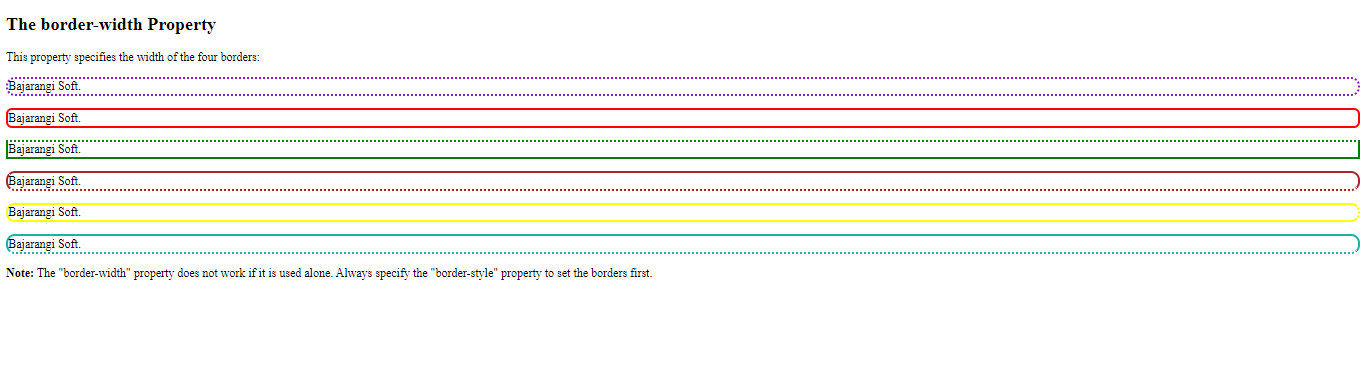
<!DOCTYPE html>
<html>
<head>
    <style>
        p.one {
            border-style: solid;
            border-color: #881ec2;
            border-width:3px;
            border-top-style: dotted;
            border-right-style: dotted;
            border-bottom-style: dotted;
            border-left-style: dotted;
        }

        p.two {
            border-style: solid;
            border-color: red;
            border-width:3px;
            border-top-style: solid;
            border-right-style: solid;
            border-bottom-style: solid;
            border-left-style: solid;
        }

        p.three {
            border-style: dotted;
            border-color: green;
            border-width:3px;
            border-top-style: dotted;
            border-right-style: solid;
            border-bottom-style: solid;
            border-left-style: solid;
        }

        p.four {
            border-style: dotted;
            border-color: brown;
            border-width:3px;
            border-top-style: solid;
            border-right-style: solid;
            border-bottom-style: dotted;
            border-left-style: solid;


        }

        p.five {
            border-style: double;
            border-color: yellow;
            border-width:3px;
            border-top-style: solid;
            border-right-style:dotted;
            border-bottom-style: solid;
            border-left-style: solid;
        }

        p.six {
            border-style: double;
            border-color: lightseagreen;
            border-width:3px;
            border-top-style: solid;
            border-right-style: solid;
            border-bottom-style: dotted;
            border-left-style: solid;
        }
    </style>
</head>
<body>

<h2>The border-width Property</h2>
<p>This property specifies the width of the four borders:</p>

<p class="one">Bajarangi Soft.</p>
<p class="two">Bajarangi Soft.</p>
<p class="three">Bajarangi Soft.</p>
<p class="four">Bajarangi Soft.</p>
<p class="five">Bajarangi Soft.</p>
<p class="six">Bajarangi Soft.</p>

<p><b>Note:</b> The "border-width" property does not work if it is used alone.
    Always specify the "border-style" property to set the borders first.</p>

</body>
</html>
<!DOCTYPE html>
<html>
<head>
    <style>
        p {
            border-bottom: 6px solid red;
            background-color: lightgrey;
        }
    </style>
</head>
<body>

<h2>The border-bottom Property</h2>
<p>This property is a shorthand property for border-bottom-width, border-bottom-style, and border-bottom-color.</p>


<h2>The border-left Property</h2>
<p style="border-left: 6px solid red;
  background-color: lightgrey;">This property is a shorthand property for border-left-width, border-left-style, and border-left-color.</p>


<p style="  border: 5px solid red;">This property is a shorthand property for border-width, border-style, and border-color.</p>


</body>
</html>
<!DOCTYPE html>
<html>
<head>
    <style>
        p.normal {
            border: 2px solid red;
        }

        p.round1 {
            border: 2px solid red;
            border-radius: 5px;
        }

        p.round2 {
            border: 2px solid red;
            border-radius: 8px;
        }

        p.round3 {
            border: 2px solid red;
            border-radius: 12px;
        }
    </style>
</head>
<body>

<h2>The border-radius Property</h2>
<p>This property is used to add rounded borders to an element:</p>

<p class="normal">Bajarangi Soft</p>
<p class="round1">Bajarangi Soft</p>
<p class="round2">Bajarangi Soft</p>
<p class="round3">Bajarangi Soft</p>

</body>
</html>