
 Posted By
Bajarangi soft ,
Posted On 01-10-2020
Posted By
Bajarangi soft ,
Posted On 01-10-2020
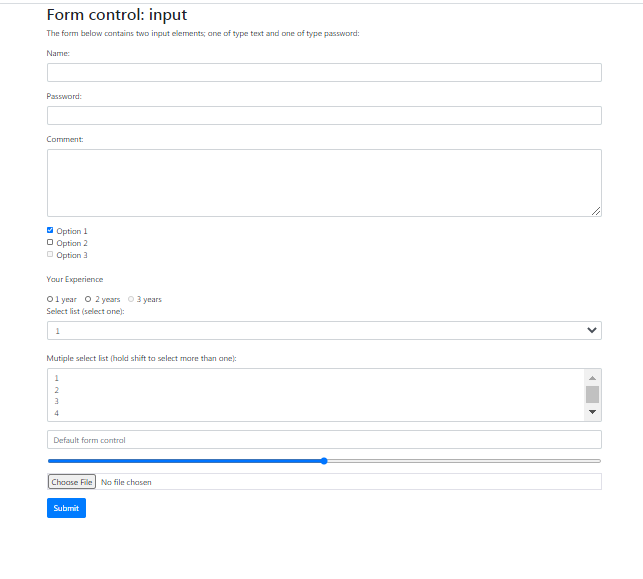
1.Simple Inputs From With Different Input Fields In Bootstrap
<!DOCTYPE html>
<html lang="en">
<head>
    <title>Bootstrap Example</title>
    <meta charset="utf-8">
    <meta name="viewport" content="width=device-width, initial-scale=1">
    <link rel="stylesheet" href="https://maxcdn.bootstrapcdn.com/bootstrap/4.5.2/css/bootstrap.min.css">
    <script src="https://ajax.googleapis.com/ajax/libs/jquery/3.5.1/jquery.min.js"></script>
    <script src="https://cdnjs.cloudflare.com/ajax/libs/popper.js/1.16.0/umd/popper.min.js"></script>
    <script src="https://maxcdn.bootstrapcdn.com/bootstrap/4.5.2/js/bootstrap.min.js"></script>
</head>
<body>

<div class="container">
    <h2>Form control: input</h2>
    <p>The form below contains two input elements; one of type text and one of type password:</p>
    <form action="/action_page.php">
        <div class="form-group">
            <label for="usr">Name:</label>
            <input type="text" class="form-control" id="usr" name="username">
        </div>
        <div class="form-group">
            <label for="pwd">Password:</label>
            <input type="password" class="form-control" id="pwd" name="password">
        </div>
        <div class="form-group">
            <label for="comment">Comment:</label>
            <textarea class="form-control" rows="5" id="comment" name="text"></textarea>
        </div>
        <div class="form-check">
            <label class="form-check-label" for="check1">
                <input type="checkbox" class="form-check-input" id="check1" name="option1" value="something" checked>Option 1
            </label>
        </div>
        <div class="form-check"><!--- you add form-check-inline-->
            <label class="form-check-label" for="check2">
                <input type="checkbox" class="form-check-input" id="check2" name="option2" value="something">Option 2
            </label>
        </div>
        <div class="form-check">
            <label class="form-check-label">
                <input type="checkbox" class="form-check-input" disabled>Option 3
            </label>
        </div><br>
<p>Your Experience</p>
        <div class="form-check-inline">
            <label class="form-check-label">
                <input type="radio" class="form-check-input" name="optradio">1 year
            </label>
        </div>
        <div class="form-check-inline">
            <label class="form-check-label">
                <input type="radio" class="form-check-input" name="optradio"> 2
 years            </label>
        </div>
        <div class="form-check-inline disabled">
            <label class="form-check-label">
                <input type="radio" class="form-check-input" name="optradio" disabled>3 years
            </label>
        </div>
        <!---multiple selection--->
        <div class="form-group">
            <label for="sel1">Select list (select one):</label>
            <select class="form-control" id="sel1" name="sellist1">
                <option>1</option>
                <option>2</option>
                <option>3</option>
                <option>4</option>
            </select>
            <br>
            <label for="sel2">Mutiple select list (hold shift to select more than one):</label>
            <select multiple class="form-control" id="sel2" name="sellist2">
                <option>1</option>
                <option>2</option>
                <option>3</option>
                <option>4</option>
                <option>5</option>
            </select>
        </div>
<!--- FORM SIZING AND  PALIN TEXT--->
        <div class="form-group">
            <input type="text" class="form-control" placeholder="Default form control" name="text2">
        </div>

<!----CONTROL RANGE FILE---->
        <div class="form-group">
            <input type="range" class="form-control-range" name="range">
        </div>
        <div class="form-group">
            <input type="file" class="form-control-file border" name="file">
        </div>

        <button type="submit" class="btn btn-primary">Submit</button>
    </form>
</div>

</body>
</html>