
 Posted By
Bajarangi soft ,
Posted On 10-10-2020
Posted By
Bajarangi soft ,
Posted On 10-10-2020
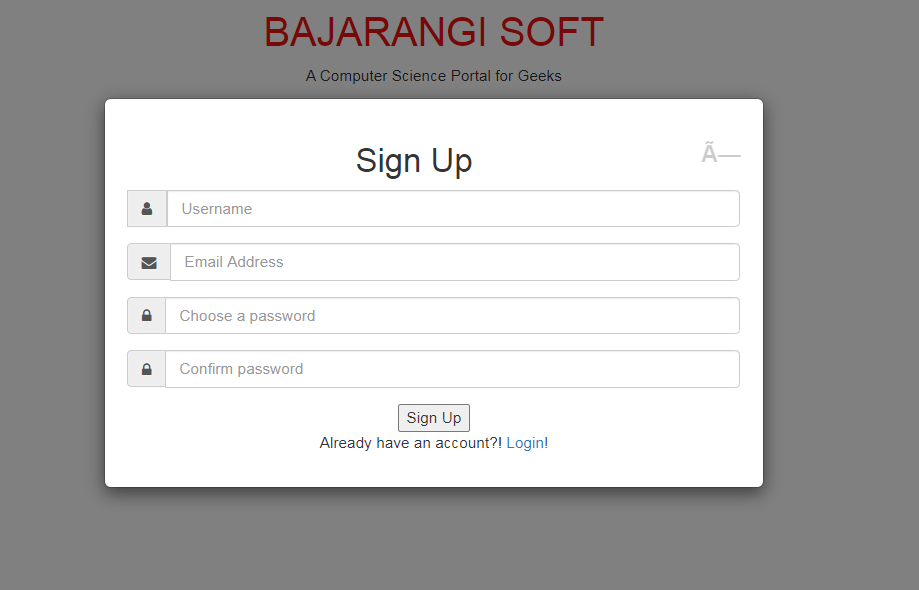
Example 1:
First, we will design modal content for the sign-up then by using CSS we will align that modal centered(vertically). Using the vertical-align property, the vertical-align property sets the vertical alignment of an element.
<!DOCTYPE html>
<html>

<head>
    <title>Bootstrap Modal Alignment</title>
    <link rel="stylesheet" href="https://maxcdn.bootstrapcdn.com/font-awesome/4.7.0/css/font-awesome.min.css" />
    <link rel="stylesheet" href="https://maxcdn.bootstrapcdn.com/bootstrap/3.3.7/css/bootstrap.min.css" integrity="sha384-BVYiiSIFeK1dGmJRAkycuHAHRg32OmUcww7on3RYdg4Va+PmSTsz/K68vbdEjh4u" crossorigin="anonymous">
    <script src="https://ajax.googleapis.com/ajax/libs/jquery/1.12.4/jquery.min.js"></script>
    <script src="https://maxcdn.bootstrapcdn.com/bootstrap/3.3.7/js/bootstrap.min.js"></script>

    <style>

        /* Text alignment for body */
        body {
            text-align: center;
        }

        /* Styling h1 tag */
        h1 {
            color: #e33112;
            text-align: center;
        }

        /* Styling modal */
        .modal:before {
            content: '';
            display: inline-block;
            height: 100%;
            vertical-align: middle;
        }

        .modal-dialog {
            display: inline-block;
            vertical-align: middle;
        }

        .modal .modal-content {
            padding: 20px 20px 20px 20px;
            -webkit-animation-name: modal-animation;
            -webkit-animation-duration: 0.5s;
            animation-name: modal-animation;
            animation-duration: 0.5s;
        }

        @-webkit-keyframes modal-animation {
            from {
                top: -100px;
                opacity: 0;
            }
            to {
                top: 0px;
                opacity: 1;
            }
        }

        @keyframes modal-animation {
            from {
                top: -100px;
                opacity: 0;
            }
            to {
                top: 0px;
                opacity: 1;
            }
        }
    </style>
</head>

<body>

<h1>
 Bajarangi Soft
</h1>
<p>
    A Computer Science Portal for Geeks
</p>
<a href="#signupModal" data-toggle="modal">
    Sign-Up</a>

<div class="modal" id="signupModal"
     role="dialog" aria-labelledby="myModalLabel"
     aria-hidden="true">

    <div class="modal-dialog">
        <div class="modal-content">

            <!-- Modal root -->
            <div class="m-header">
                <button class="close" data-dismiss="modal">
                    ×
                </button>
                <h2 class="myModalLabel"> Sign Up </h2>
            </div>

            <!-- Modal body -->
            <div class="inputs">

                <!-- username input -->
                <div class="form-group input-group">
                    <label for="username" class="sr-only">
                        Username
                    </label>
                    <span class="input-group-addon">
                  <i class="fa fa-user"></i>
                  </span>
                    <input type="text" class="form-control"
                           id="username" placeholder="Username">
                </div>

                <!-- Email input -->
                <div class="form-group input-group">
                  <span class="input-group-addon">
                  <i class="fa fa-envelope"></i>
                  </span>
                    <label for="email" class="sr-only">
                        Email
                    </label>
                    <input type="email" class="form-control"
                           id="email" placeholder="Email Address">
                </div>

                <!-- Password -->
                <div class="form-group input-group">
                  <span class="input-group-addon">
                  <i class="fa fa-lock"></i>
                  </span>
                    <label for="password" class="sr-only">
                        Password
                    </label>
                    <input type="password" class="form-control"
                           id="password" placeholder="Choose a password">
                </div>

                <!-- Confirm Password -->
                <div class="form-group input-group">
                  <span class="input-group-addon">
                  <i class="fa fa-lock"></i>
                  </span>
                    <label for="password2" class="sr-only">
                        Confirm Password
                    </label>
                    <input type="password" class="form-control"
                           id="password2" placeholder="Confirm password">
                </div>
            </div>

            <!-- Modal footer -->
            <div class="footer">
                <button type="submit">Sign Up</button>
                <p>
                    Already have an account?!
                    <a href="#loginModal" data-toggle="modal"
                       data-dismiss="modal">
                        Login!
                    </a>
                </p>
            </div>

        </div>
    </div>
</div>

</body>

</html>
<!DOCTYPE html>
<html>

<head>
    <title>Center Align Bootstrap Modal Vertically</title>
    <link rel="stylesheet" href="https://maxcdn.bootstrapcdn.com/font-awesome/4.7.0/css/font-awesome.min.css" />
    <link rel="stylesheet" href="https://maxcdn.bootstrapcdn.com/bootstrap/3.3.7/css/bootstrap.min.css" integrity="sha384-BVYiiSIFeK1dGmJRAkycuHAHRg32OmUcww7on3RYdg4Va+PmSTsz/K68vbdEjh4u" crossorigin="anonymous">
    <script src="https://ajax.googleapis.com/ajax/libs/jquery/1.12.4/jquery.min.js"></script>
    <script src="https://maxcdn.bootstrapcdn.com/bootstrap/3.3.7/js/bootstrap.min.js">
   </script>

    <style>

        /* Text alignment for body */
        body {
            text-align: center;
        }

        /* Styling h1 tag */
        h1 {
            color: #ec1313;
            text-align: center;
        }

        /* Styling modal */
        .modal .modal-content {
            padding: 20px 20px 20px 20px;
            -webkit-animation-name: modal-animation;
            -webkit-animation-duration: 0.5s;
            animation-name: modal-animation;
            animation-duration: 0.5s;
        }

        @-webkit-keyframes modal-animation {
            from {
                top: -100px;
                opacity: 0;
            }
            to {
                top: 0px;
                opacity: 1;
            }
        }

        @keyframes modal-animation {
            from {
                top: -100px;
                opacity: 0;
            }
            to {
                top: 0px;
                opacity: 1;
            }
        }
    </style>
</head>

<body>

<h1>
    BAJARANGI SOFT
</h1>
<p>
    A Computer Science Portal for Geeks
</p>
<a href="#signupModal" data-toggle="modal">
    Sign-Up
</a>

<div class="modal" id="signupModal"
     role="dialog" aria-labelledby="myModalLabel"
     aria-hidden="true">

    <div class="modal-dialog">
        <div class="modal-content">

            <!-- Modal root -->
            <div class="m-header">
                <button class="close" data-dismiss="modal">
                    ×
                </button>
                <h2 class="myModalLabel">Sign Up</h2>
            </div>

            <!-- Modal body -->
            <div class="inputs">

                <!-- username input -->
                <div class="form-group input-group">
                    <label for="username" class="sr-only">
                        Username
                    </label>
                    <span class="input-group-addon">
                  <i class="fa fa-user"></i>
                  </span>
                    <input type="text" class="form-control"
                           id="username" placeholder="Username">
                </div>

                <!-- Email input -->
                <div class="form-group input-group">
                  <span class="input-group-addon">
                  <i class="fa fa-envelope"></i>
                  </span>
                    <label for="email" class="sr-only">
                        Email
                    </label>
                    <input type="email" class="form-control"
                           id="email" placeholder="Email Address">
                </div>

                <!-- Password -->
                <div class="form-group input-group">
                  <span class="input-group-addon">
                  <i class="fa fa-lock"></i>
                  </span>
                    <label for="password" class="sr-only">
                        Password
                    </label>
                    <input type="password" class="form-control"
                           id="password" placeholder="Choose a password">
                </div>

                <!-- Confirm Password -->
                <div class="form-group input-group">
                  <span class="input-group-addon">
                  <i class="fa fa-lock"></i>
                  </span>
                    <label for="password2" class="sr-only">
                        Confirm Password
                    </label>
                    <input type="password" class="form-control"
                           id="password2" placeholder="Confirm password">
                </div>
            </div>

            <!-- MOdal footer -->
            <div class="footer">
                <button type="submit">Sign Up</button>
                <p>
                    Already have an account?!
                    <a href="#loginModal" data-toggle="modal"
                       data-dismiss="modal">
                        Login!
                    </a>
                </p>
            </div>

        </div>
    </div>
</div>

<script>
    $(document).ready(function() {

        /* Centering the modal vertically */
        function alignModal() {
            var modalDialog = $(this).find(".modal-dialog");
            modalDialog.css("margin-top", Math.max(0,
                ($(window).height() - modalDialog.height()) / 2));
        }
        $(".modal").on("shown.bs.modal", alignModal);

        /* Resizing the modal according the screen size */
        $(window).on("resize", function() {
            $(".modal:visible").each(alignModal);
        });
    });
</script>

</body>

</html>