
 Posted By
Bajarangi soft ,
Posted On 01-10-2020
Posted By
Bajarangi soft ,
Posted On 01-10-2020
Syntax and Usage
window.open(URL, name, specs, replace)
Parameter Values
| Parameter | Description | ||||||||||||||||||||||||||||
|---|---|---|---|---|---|---|---|---|---|---|---|---|---|---|---|---|---|---|---|---|---|---|---|---|---|---|---|---|---|
| URL | Optional. Specifies the URL of the page to open. If no URL is specified, a new window/tab with about:blank is opened | ||||||||||||||||||||||||||||
| name | Optional. Specifies the target attribute or the name of the window. The following values are supported:
|
||||||||||||||||||||||||||||
| specs | Optional. A comma-separated list of items, no whitespaces. The following values are supported:
|
||||||||||||||||||||||||||||
| replace | Optional. Specifies whether the URL creates a new entry or replaces the current entry in the history list. The following values are supported:
|
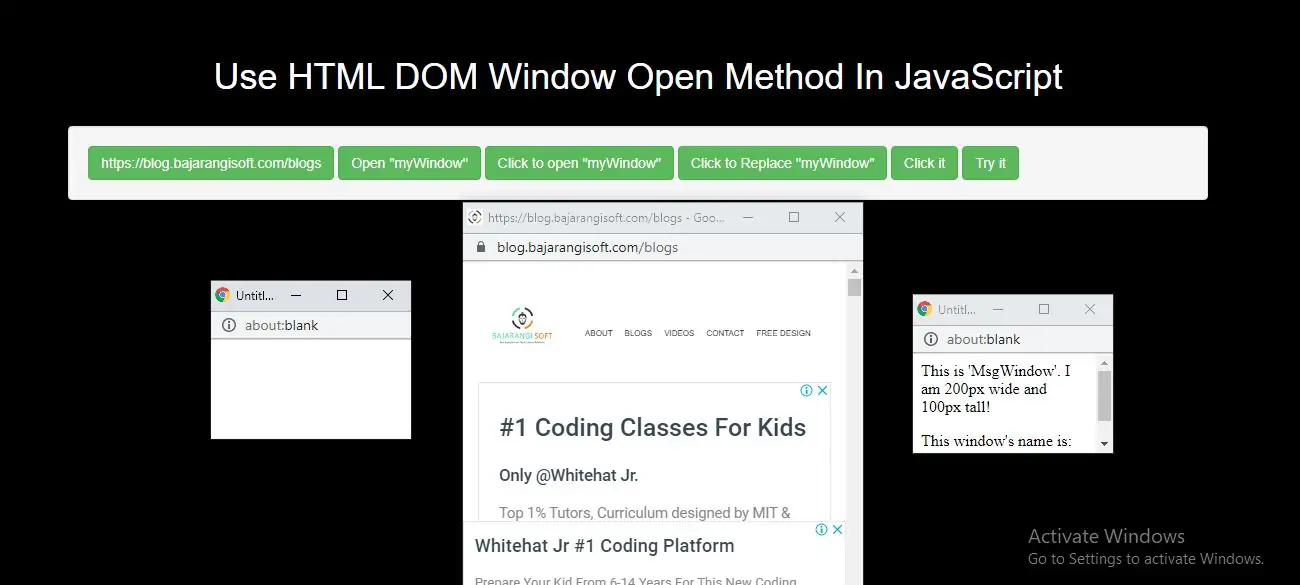
Example(1)
<button class="btn btn-success" onclick="myFunction()">Click it</button>

<script>
    function myFunction() {
        window.open("https://blog.bajarangisoft.com/blogs");
    }
</script>
<button class="btn btn-success" onclick="open_window()">Try it</button>

<script>
    function open_window() {
        var myWindow = window.open("", "", "width=200,height=100");
    }
</script>
<button class="btn btn-success" onclick="open_window()">Try it</button>

<script>
    function open_window() {
        var myWindow = window.open("", "MsgWindow", "width=200,height=100");
        myWindow.document.write("<p>This is 'MsgWindow'. I am 200px wide and 100px tall!</p>");
    }
</script>
<button class="btn btn-success" onclick="replace_window()">Try it</button>

<script>
    function replace_window() {
        var myWindow = window.open("", "_self");
        myWindow.document.write("<p>I replaced the current window.</p>");
    }
</script>
<!DOCTYPE html>
<html>
<head>
    <title>Use HTML DOM Window Open Method In JavaScript</title>
    <meta charset="utf-8">
    <meta name="viewport" content="width=device-width, initial-scale=1">
    <link rel="stylesheet" href="https://maxcdn.bootstrapcdn.com/bootstrap/3.4.1/css/bootstrap.min.css">
</head>
<style>
    h1 {
        color: White;

    }
body{
    background:black

}
</style>

<body>
<div class="container">
    <br>
    <div class="text-center">
        <h1>Use HTML DOM Window Open Method In JavaScript</h1>
    </div>
    <br>
   <div class="well">
       <button class="btn btn-success" onclick="open_function()">https://blog.bajarangisoft.com/blogs</button>
       <button class="btn btn-success" onclick="new_window()">Open "myWindow"</button>
       <button class="btn btn-success" onclick="with_msg()">Click to open "myWindow"</button>
       <button class="btn btn-success" onclick="replace_window()">Click to Replace "myWindow"</button>
       <button class="btn btn-success" onclick="open_windowlink()">Click it</button>
       <button class="btn btn-success" onclick="myFunction()">Try it</button>
   </div>
</body>
</html>
<script>
    function open_function() {
        window.open("https://blog.bajarangisoft.com/blogs");
    }
    function new_window() {
        var myWindow = window.open("", "", "width=200,height=100");
    }
    function with_msg() {
        var myWindow = window.open("", "MsgWindow", "width=200,height=100");
        myWindow.document.write("<p>This is 'MsgWindow'. I am 200px wide and 100px tall!</p>");
    }
    function replace_window() {
        var myWindow = window.open("", "_self");
        myWindow.document.write("<p>I replaced the current window.</p>");
    }
    function open_windowlink() {
        window.open("https://blog.bajarangisoft.com/blogs", "_blank",              "toolbar=yes,scrollbars=yes,resizable=yes,top=500,left=500,width=400,height=400");
    }
    function myFunction() {
        var myWindow = window.open("", "MsgWindow", "width=200,height=100");
        myWindow.document.write("<p>This window's name is: " + myWindow.name + "</p>");
    }
</script>